
取扱説明書
CXC v2
はじめに
本ガイドは、本製品の設置と使用をできるだけ容易にするために作成されています。本書の情報は印刷時に正確性を慎重に確認しています。ただし Cambridge Audio は継続的な改善を方針としており、設計および仕様は予告なく変更されることがあります。
This guide is designed to make installing and using this product as easy as possible. Information in this document has been carefully checked for accuracy at the time of printing; however, Cambridge Audio’s policy is one of continuous improvement, therefore design and specifications are subject to change without prior notice.
本書には著作権で保護された専有情報が含まれています。無断複写・転載を禁じます。製造元の書面による事前の許可なく、本マニュアルの一部または全部を、機械的・電子的・その他いかなる手段でも複製してはなりません。すべての商標および登録商標は、各所有者に帰属します。
This document contains proprietary information protected by copyright. All rights are reserved. No part of this manual may be reproduced by any mechanical, electronic or other means, in any form, without prior written permission of the manufacturer. All trademarks and registered trademarks are the property of their respective owners.
© Copyright Cambridge Audio Ltd 2026
© Copyright Cambridge Audio Ltd 2026
このマニュアル内の画像の一部は、元の PDF から自動生成されたものです。自動処理の都合上、製品の細部や配線図などが実際と異なる場合があります。正確な形状・寸法・配線は、実機および製品ページの写真、同梱の正規マニュアル(英語版)をあわせてご確認ください。
CXC の同梱品
CXC の箱には以下が同梱されています。
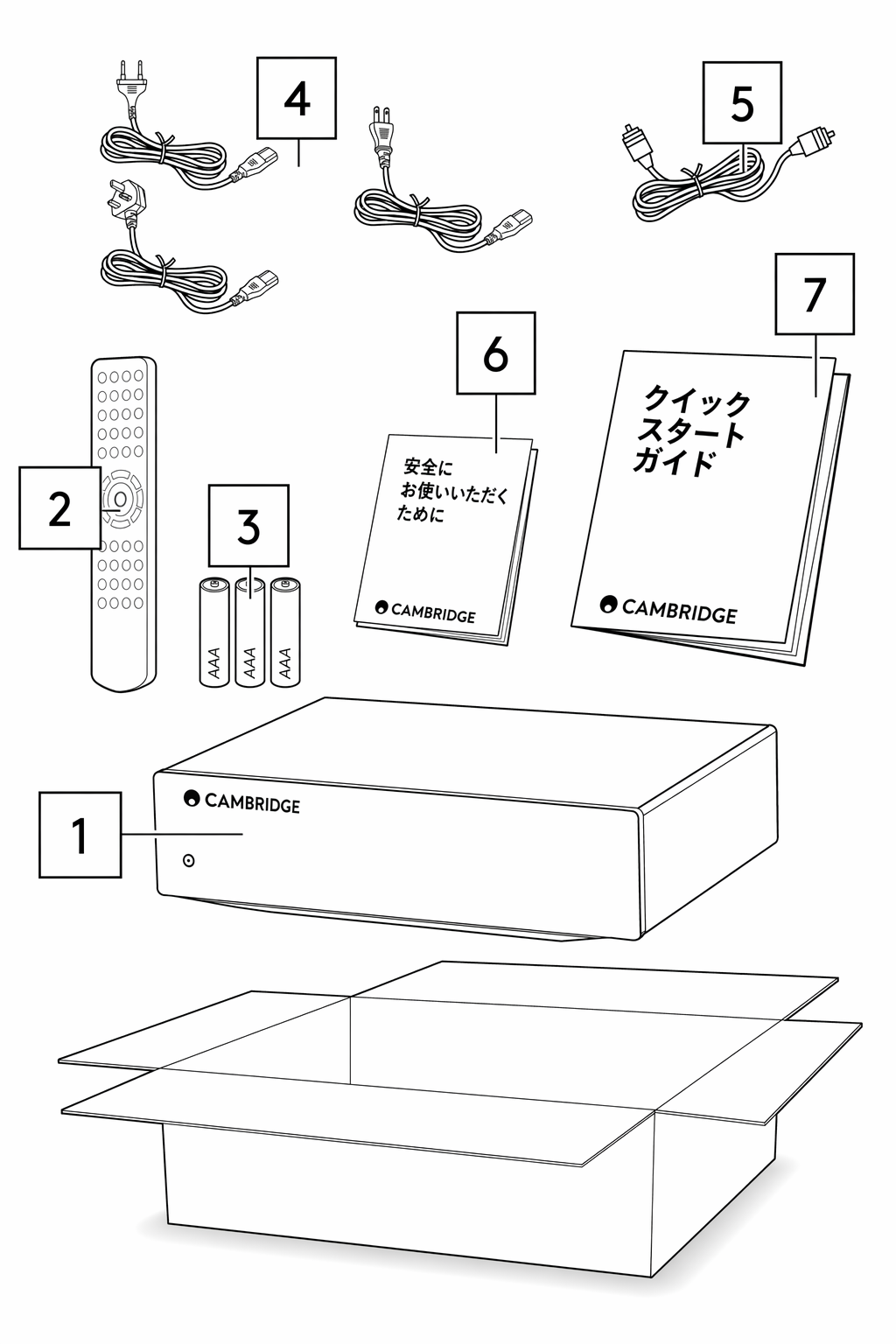
1. CXC CD トランスポート 2. リモコン 3. 単 4 電池 × 3 本 4. 英国用電源コード(5A ヒューズ付き)(CXC の購入国により異なります)、EU 用電源コード(購入国により異なります)、CU 用電源コード(購入国により異なります) 5. オレンジ色のコントロールバスケーブル 6. 安全ガイド 7. クイックスタートガイド
1. CXC CD Transport 2. Remote Control 3. 3 x AAA Batteries 4. UK power cord (5A fused) (Depending on which country the CXC was purchased in), EU power cord (Depending on which country the CXC was purchased in), CU power cord (Depending on which country the CXC was purchased in) 5. Orange Control bus cable. 6. Safety Guide 7. Quickstart Guide
フロントパネルのコントロール
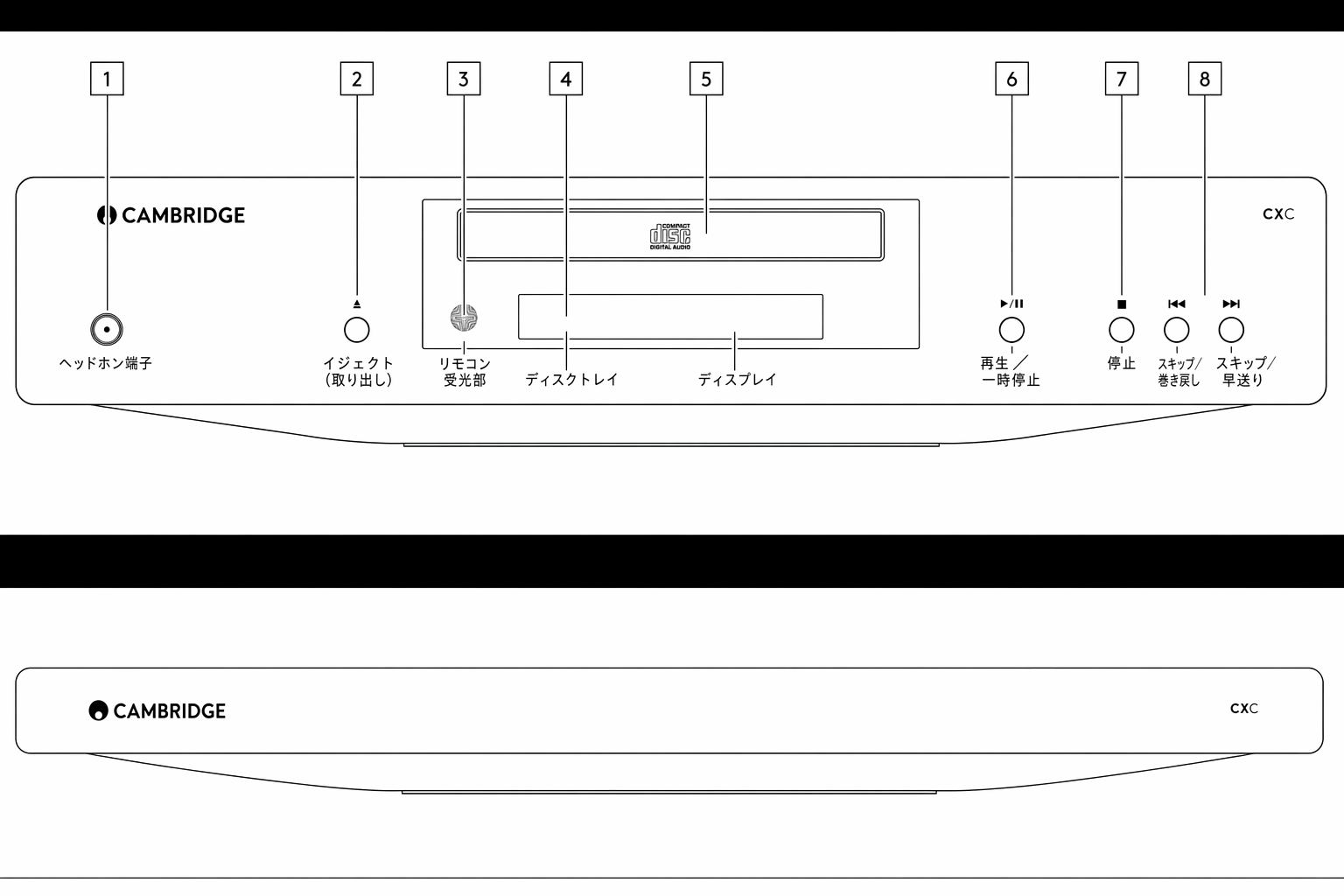
1. スタンバイ/オン — 本機を低消費電力のスタンバイモード(電源 LED が暗く点灯)とオン状態(電源 LED が明るく点灯)の間で切り替えます。CXC はオートパワーダウン(APD)が初期設定で有効になっており、30 分間操作がないと自動的にスタンバイへ移行します。
1. Standby/On – Switches the unit between low-power standby mode (indicated by a dim power LED), and on (indicated by a bright power LED). The CXC has Auto Power Down (APD) enabled by default, and the unit will automatically switch to standby after 30 minutes of inactivity.
2. Open/Close ボタン — CXC のディスクローディングトレイを開閉します。
2. Open/Close Button – Opens or closes the CXC’s disc loading tray.
3. 赤外線受光部 — CXC リモコンからの赤外線コマンドを受信します。正しく動作させるには、赤外線受光部と CXC リモコンの間に遮るものがないようにしてください。
3. Infrared Receiver – Receives infrared commands from the CXC remote. For correct operation there must be a clear line of sight between the infrared receiver, and the CXC remote control
4. ディスプレイ — 現在選択されているソースや各種の再生情報を表示します。
4. Display – The display shows the current selected source and a variety of playback information.
5. ディスクトレイ — コンパクトディスクを挿入するためのトレイです。Open/Close ボタンで操作します。
5. Disc Tray – Used for the loading of compact discs, operated by the Open/Close button.
6. Play/Pause ボタン — 押すと、セットしたディスクを再生、または再生を一時停止します。注:ディスクトレイが開いている状態でこのボタンを押すと、トレイが閉まります。
6. Play/Pause Button – Press to play a loaded disc or pause playback. Note: Pressing this button whilst the disc tray is open will close the tray.
7. Stop ボタン — CD の再生を停止します。
7. Stop Button – Stops CD playback.
8. Skip/Scan ボタン — CD のトラックを送る・戻すときに使用します。どちらかのボタンを長押しすると、現在のトラック内を早送りまたは早戻しします。Skip/Scan ボタンはメニュー操作にも使用します。
8. Skip/Scan Buttons – Press to skip CD tracks. Pressing and holding either button will scan forwards or backwards through the current track. The skip/scan buttons are also used for menu navigation.
ディスプレイの表示機能
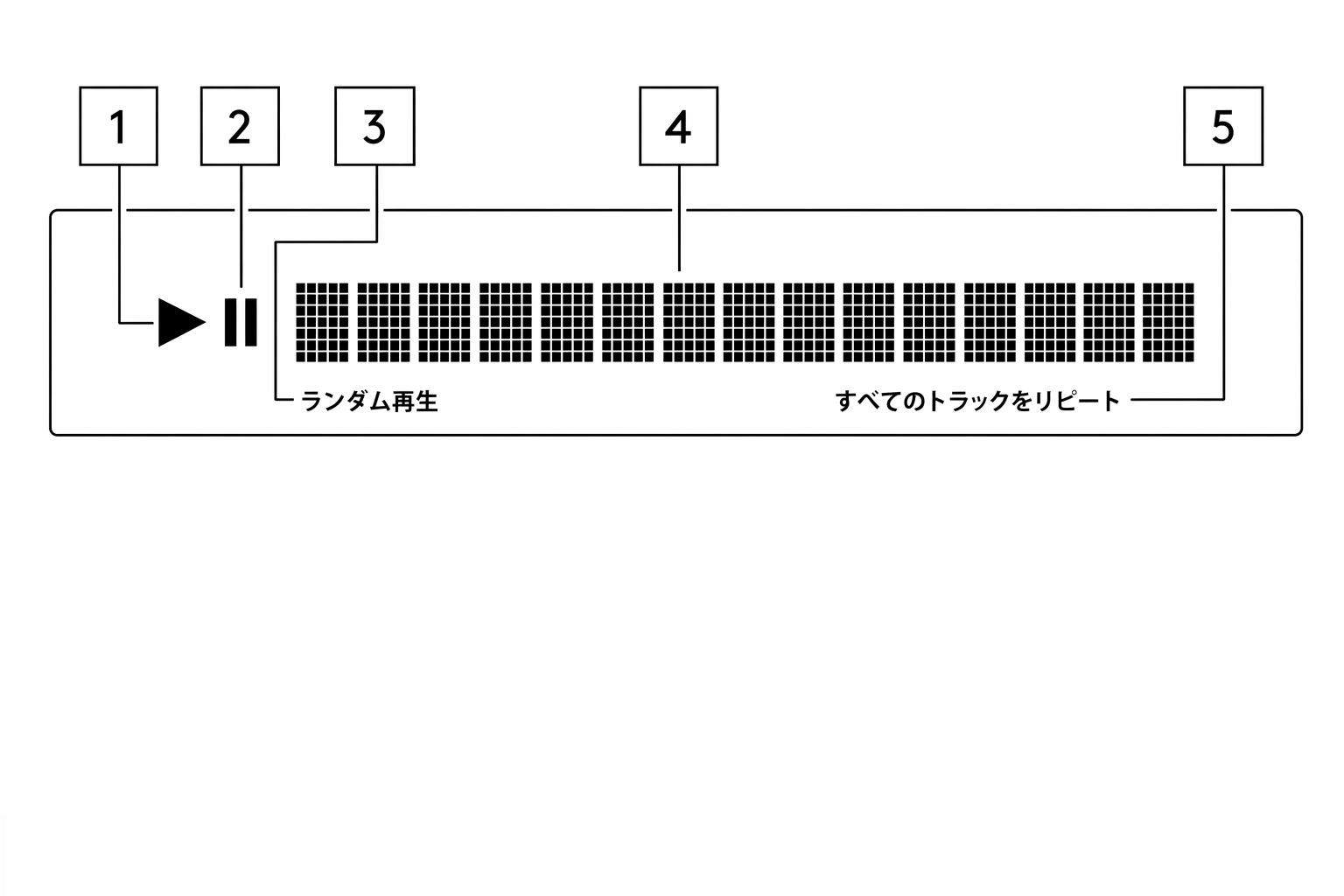
1. Play — ディスク再生中に点灯します。
1. Play – Illuminated during disc playback.
2. Pause — ディスクの再生が一時停止中であることを示します。
2. Pause – Indicates that disc playback has been paused.
3. ディスプレイ — CD のトラック数や総再生時間などの再生情報を表示します。
3. Display - Shows playback information including the number of tracks on the CD and the total length of the CD.
4. Random — ランダム再生モードが選択されていることを示します。セットした CD のトラックを無作為な順序で再生します。
4. Random – Indicates that ‘random’ playback mode has been selected. This will randomise the playback order of the loaded CDs tracks.
5. Repeat All/Track — 「Repeat All」選択時に点灯し、CD 全体を繰り返し再生することを示します。「Repeat Track」選択時にも点灯します。
5. Repeat All/Track – Illuminated when ‘Repeat All’ is selected, indicating that the whole CD will be repeated, or ‘Repeat Track’
リアパネルの接続端子
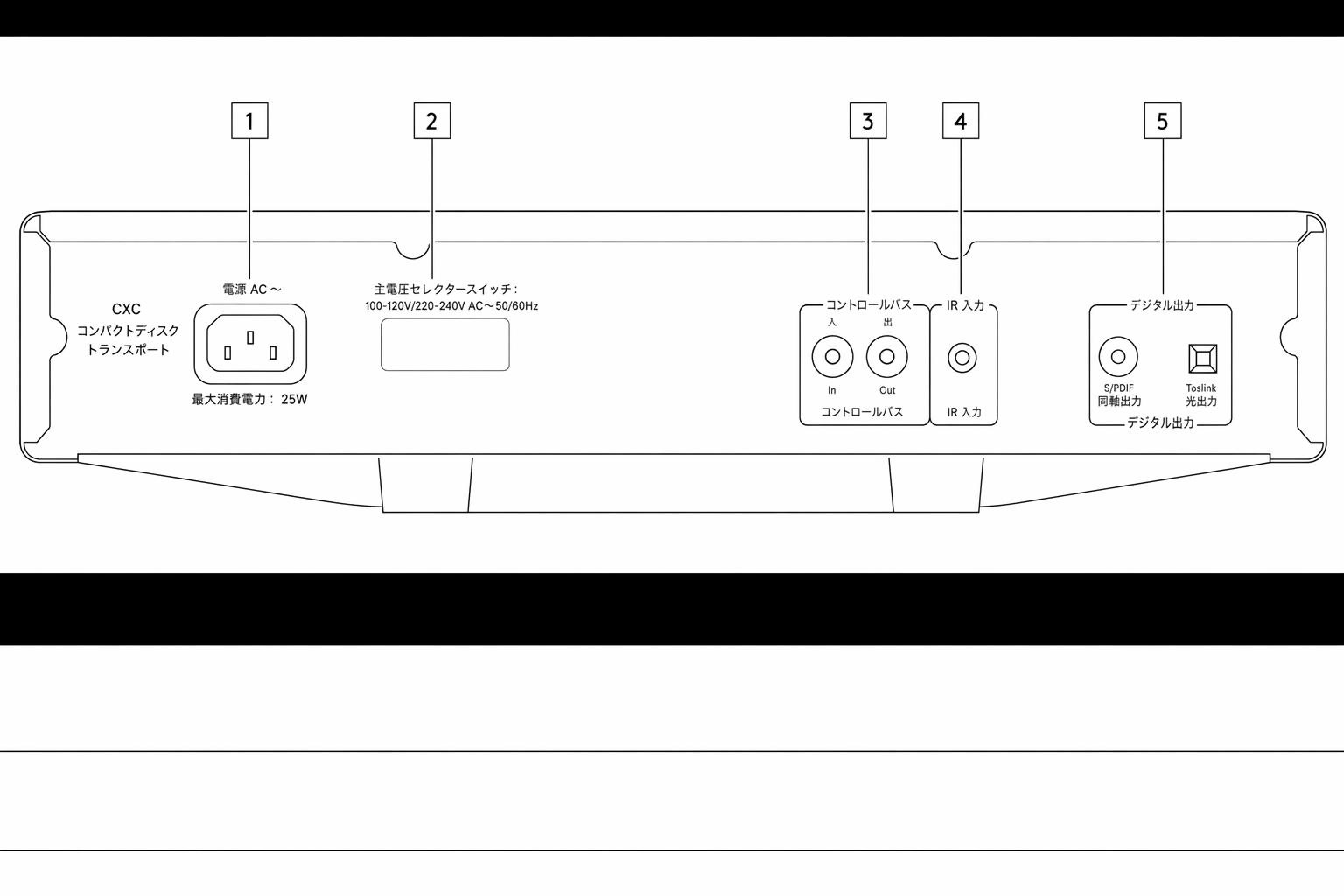
1. AC 電源ソケット — CD プレーヤーへのすべての接続が完了したら、AC 電源ケーブルを適切な電源コンセントに差し込み、電源を入れてください。これで CD プレーヤーは使用可能な状態になります。
1. AC Power Socket – Once you have completed all connections to the CD player, plug the AC power cable into an appropriate mains socket then switch on. Your CD player is now ready for use.
2. 電圧切替スイッチ — CXC の電源電圧を 115V と 230V の間で切り替えます。
2. Mains Voltage Selector Switch – Switches the CXC mains voltage between 115V and 230V.
注:Cambridge Audio 認定サービス担当者専用です。
Note: For use by certified Cambridge Audio service personnel only.
3. Control Bus — 接続された他の CX シリーズ製品と電源や音量のコマンドを送受信する RCA ソケットです。Control Bus の詳細は「Control Bus」の章を参照してください。
3. Control Bus – RCA sockets used to send and receive power and volume commands from other connected CX Series products. For more information on the Control Bus, see Control Bus section.
4. IR In — IR リピーターやカスタムインストール機器からの変調赤外線コマンドを CD プレーヤーが受信できる端子です。IR In ソケットで受信したコマンドは Control Bus には出力されません。注:IR 入力は電源を供給しません。このため、この入力に接続する機器は別途電源が必要です。
4. IR In – Allows modulated IR commands from an IR repeater or custom install systems to be received by the CD player. Commands received by the IR In socket are not looped out of the Control Bus. Note: The IR input doesn’t provide any power, so any device connected to this input will need to have its own power source.
5. デジタル出力 — CXC には 2 系統のデジタル出力があります。短距離で高品質な伝送に適した TOSLINK 光出力が 1 系統、長距離接続に使用できる S/PDIF 同軸出力が 1 系統です。S/PDIF で最良の結果を得るには、75 Ω の高品位デジタル RCA インターコネクトケーブル(通常のオーディオ用ケーブルではないもの)を使用してください。TOSLINK で最良の結果を得るには、オーディオ用に設計された高品位の光ファイバーケーブルを使用してください。
5. Digital Outputs – The CXC has two digital outputs. One TOSLINK optical which can provide high quality transfer over shorter distances, and one S/P DIF coaxial which can be used for longer connections. For best results via S/P DIF use a high-quality 75-ohm digital RCA interconnect cable (not one designed for normal audio use). For best results via TOSLINK use a high-quality fibre optic interconnect cable designed for audio use.
リモコン
CXC には、フロントパネルの操作機能を再現したリモコンが付属しています。このリモコンは他の CX シリーズ製品も操作できます。使用前に、付属の単 4 電池をリモコンにセットしてください。
The CXC is supplied with a remote-control handset that duplicates the front panel control functions and is also able to control other CX series products. The supplied AAA batteries must be fitted before the remote control can be used.
| 1. Brightness — CXC のディスプレイのバックライトを Bright、Dim、Off の 3 段階で切り替えます。 2. スタンバイ/オン — 本機をオン状態と低消費電力のスタンバイ状態の間で切り替えます。 3. Play — セットした CD を再生します。 4. Pause — CD の再生を一時停止します。 5. Stop — CD の再生を停止します。 6. Open/Close ボタン — CXC のディスクローディングトレイを開閉します。 7. Scan — 長押しすると、選択中のトラック内を早送り・早戻しします。7 秒間押し続けるとスキャン速度が上がります。右ボタンで早送り、左ボタンで早戻しを行います。 8. Skip — 左ボタンで 1 つ前のトラックへ、右ボタンで 1 つ先のトラックへスキップします。 9. Repeat — 1 回押すと「Repeat All」となり、CD 全体を繰り返し再生します。再生中にトラックを 2 回押すと、そのトラックを繰り返し再生します。 10. Random — 押すと CD 全体をランダムな順序で再生します。注:Repeat および Random ボタンは、ディスプレイのバックライトが「Bright」または「Dim」の場合のみ動作します。「Off」に設定されている場合は反応しません。リモコンが動作しない場合は、電池が消耗していないか、フロントパネルの赤外線受光部が遮られていないかを確認してください。 |
|---|
接続方法
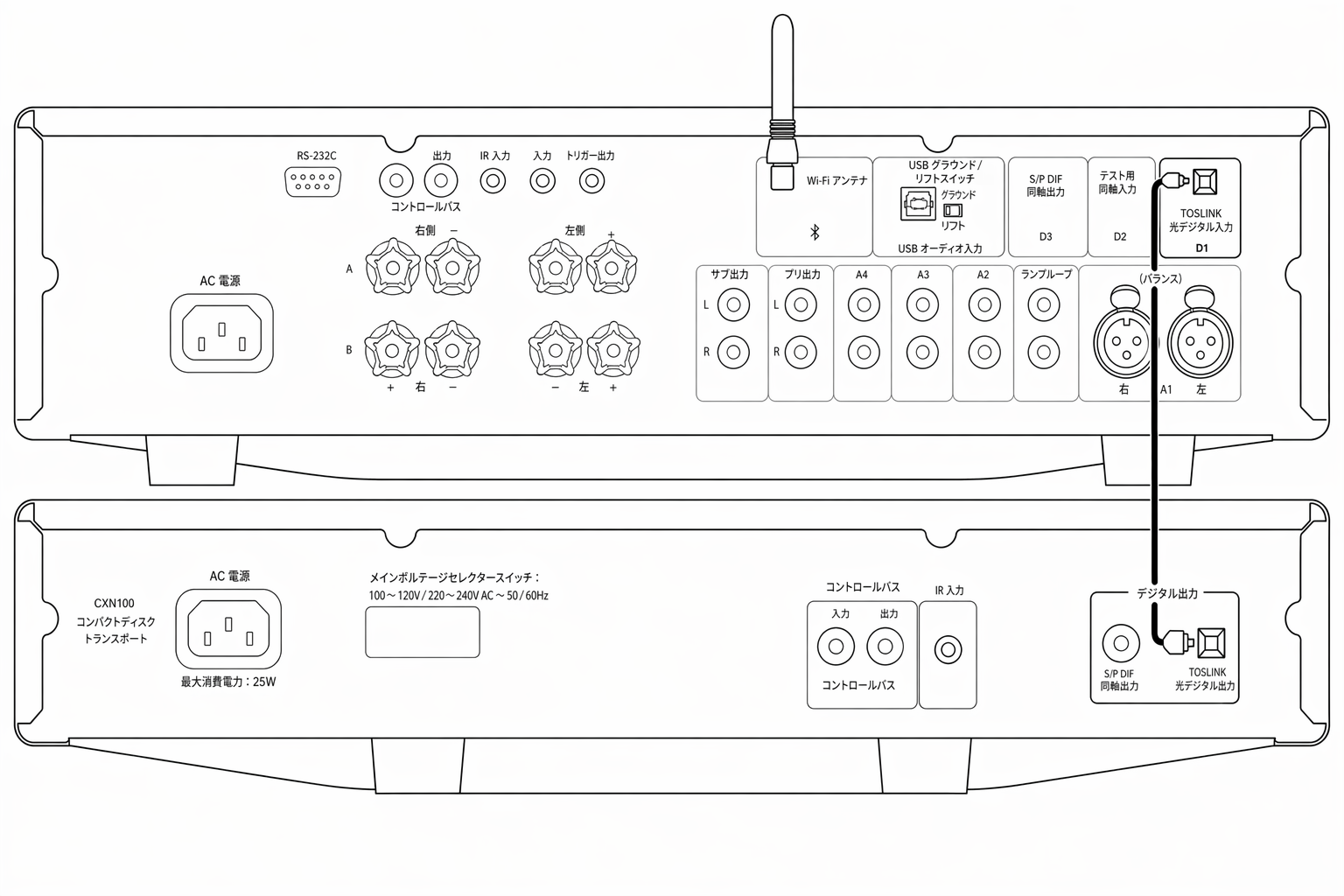
TOSLINK 光ケーブルで CXC と CXA81 を接続する場合:
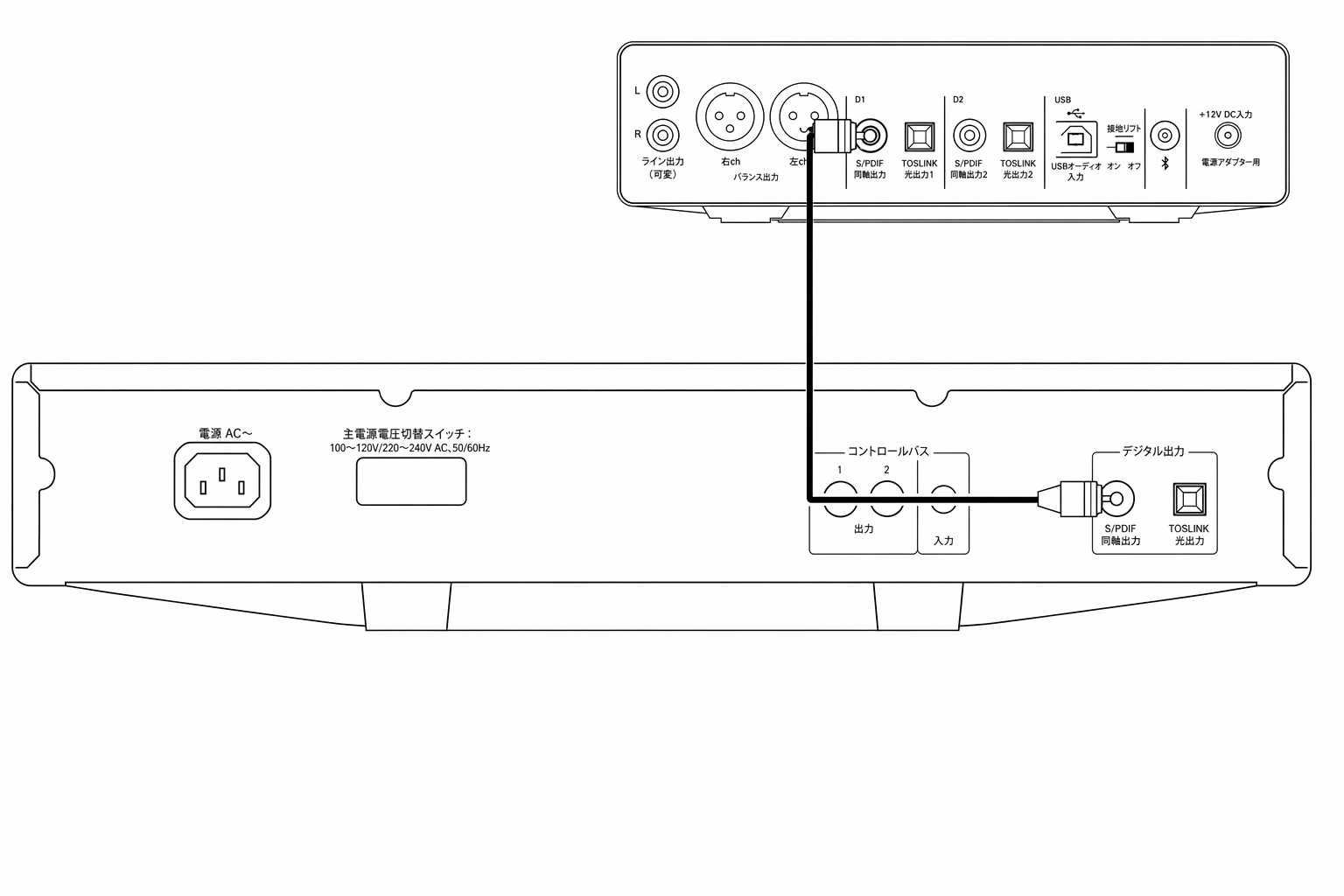
S/PDIF 同軸ケーブルで CXC と DacMagic 200M を接続する場合:
初期セットアップ
- CXC を、使用する DAC、プリメインアンプ、またはネットワークストリーマーのデジタル入力に接続してください。短距離で高品質に伝送するには TOSLINK 光出力、長距離接続には S/PDIF 同軸出力を使用します。
- 使用する DAC、プリメインアンプ、またはネットワークストリーマーの出力およびスピーカー接続が確実に行われていることを確認します。
- 付属の電源ケーブルで CXC を電源コンセントに接続します。
- 本機の電源を入れ、ディスクトレイを開いて CD をセットしてください。
- 付属の電源ケーブルが、CXC 背面の電源ソケットにしっかり接続されていることを確認します。
- 電源ケーブルが電源コンセントにしっかり接続され、コンセントのスイッチがオンになっていることを確認します。
CX シリーズ機器の接続
CXC を S/PDIF で CXN V2 に接続し、CXA81 も合わせて使用する場合:
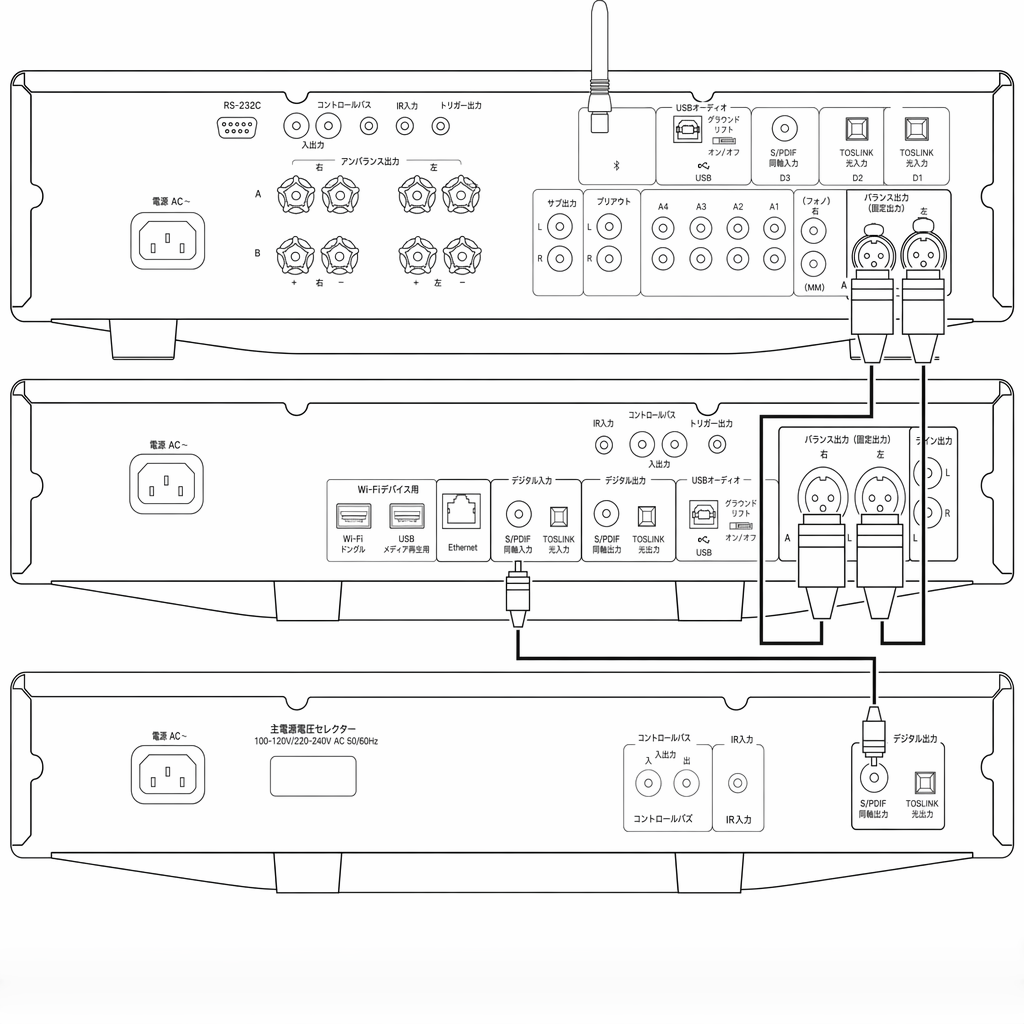
CXN V2 と CXA61/81 は、いずれも高品位な内蔵 DAC を搭載しており、音質の傾向が異なります。CXC、CXN V2、CXA61/81 の接続をいろいろ試して、好みのサウンドを見つけることをおすすめします。
Both the CXN V2, and the CXA61/81 use high quality internal DACs with differing sound profiles. It is worth experimenting with connections between the CXC, the CXN V2, and the CXA61/81 to see which you prefer.
- CXC を CXN V2 のデジタル入力のいずれかに接続します。短距離接続には S/PDIF、長距離接続には TOSLINK 光を使用してください。
- CXN V2 の出力を CXA61/81 のアナログ入力のいずれかに、バランス XLR(CXA81 のみ)またはアンバランス RCA で接続します。
- これで、CXN V2 のオーディオソースとして CXC を選択し、高音質な CD 再生が楽しめます。
あるいは、CXC を CXA61/81 の S/PDIF 入力または TOSLINK 光入力のいずれかに直接接続することもできます。この場合は CXA61/81 の内蔵 DAC が使用されます。
Alternatively, the CXC can be connected directly to the CXA61/81 using the S/P DIF input, or one of the TOSLINK optical inputs. This will then use the internal DAC of the CXA61/81.
CXC の 2 系統のデジタル出力は同時に動作します。そのため、CXC を CXN V2 と CXA61/81 の両方に同時接続し、2 通りのリスニング体験を使い分けることも可能です。
As both digital outputs on the CXC are active at the same time it is also possible to connect the CXC directly to both the CXN V2, and CXA61/81 simultaneously giving you the option of two separate listening experiences.
CXC を S/PDIF で CXN V2 に、TOSLINK 光で CXA81 に接続する場合:
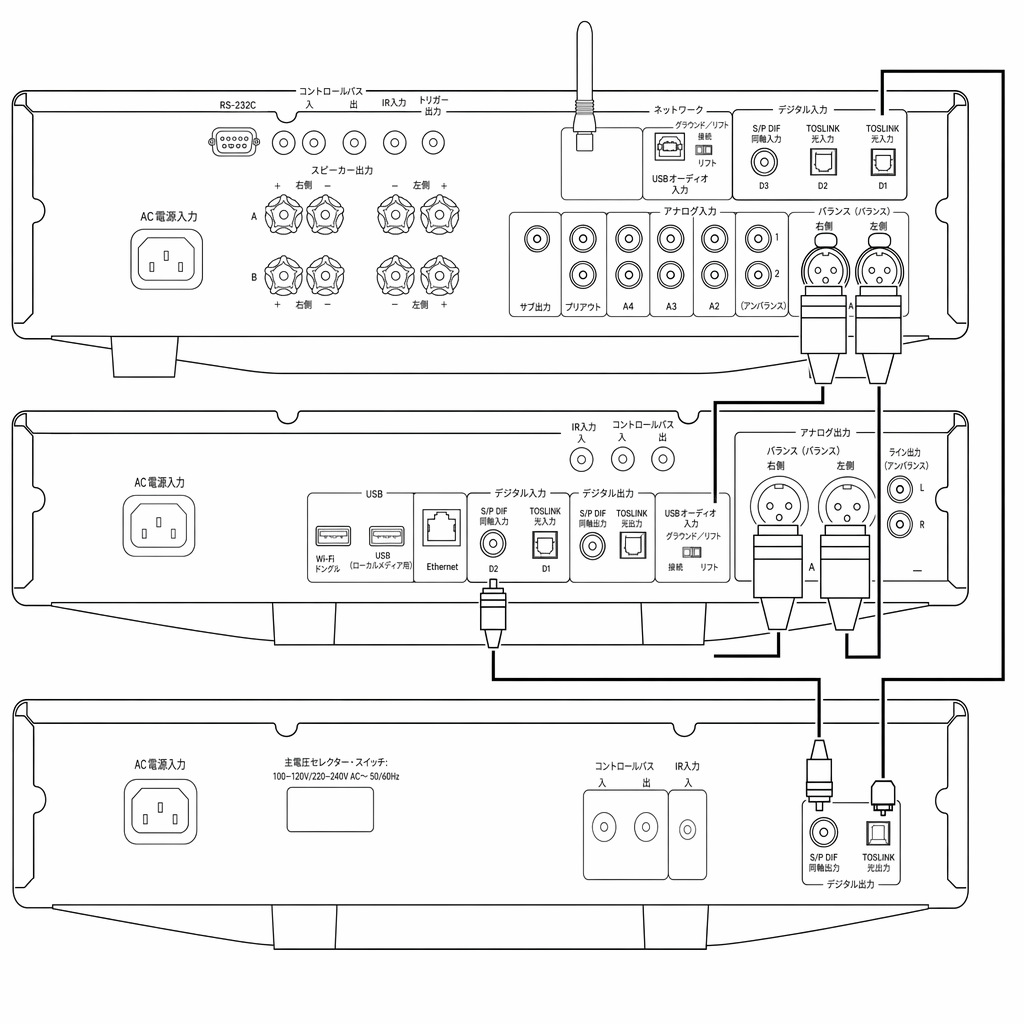
上記の構成では、CXC が CXN V2 の内蔵 DAC を使用するか、CXA の内蔵 DAC を使用するかを選べます。
With the above configuration you would be able to choose whether the CXC uses the internal DAC of the CXN V2, or that of the CXA.
注:TOSLINK で CXA61/81 または DacMagic 200M に接続する場合は、最適な性能を得るため「D1」入力を使用してください。「D2」入力を使用する場合は、「TV Mode」を無効にしてください。
Note: For optimal performance use the ‘D1’ input when connected to a CXA61/81, or DacMagic 200M via TOSLINK. Alternatively, if using the ‘D2’ input, ensure that ‘TV Mode’ is disabled.
操作方法

CXC が再生できるのは次のディスクのみです。
- コンパクトディスク
- 録音可能な CD(CD-R)
- 上記の識別ロゴが付いた書き換え可能な CD(CD-RW)
注:CD-R/CD-RW ディスクを再生するには、TOC(目次情報)が正しく記録されている必要があります。
Note: Any CD-R/CD-RW discs should contain properly recorded TOC (Table of Contents) information so that they can be played back.
CXC は音楽再生用に設計された CD-DA 形式のディスクのみ再生できます。MP3 や WMA ファイルが入った PC 用 CD-ROM など、それ以外のデータを含むディスクは再生しないでください。
The CXC can play only the discs recorded in the CD-DA format designed for music reproduction. Do not attempt to play a disc containing other data, such as a CD-ROM for PCs with MP3 or WMA files.
ディスクの出し入れ
- フロントパネルまたはリモコンの「Open/Close」ボタンを押して、CXC のディスクトレイを開きます。
- ディスクトレイが完全に開いたら、ラベル面を上にして、ディスクをていねいにトレイに置いてください。
- もう一度「Open/Close」ボタンを押して、ディスクトレイを閉じます。トレイが完全に閉じると、CXC がディスクを読み込み、内容情報を表示します。
- ディスクトレイは、再生中でもフロントパネルまたはリモコンの「Open/Close」ボタンで開けます。ディスクトレイが完全に開いてから、ディスクを取り出してください。
重要なお知らせ
- ディスクトレイにコンパクトディスク以外のものを入れないでください。機構を損傷する恐れがあります。
- ディスクトレイを開閉中に、手で無理に動かさないでください。
- 機構内への汚れやほこりの侵入を防ぐため、使用しないときはディスクトレイを閉じておいてください。
- 傷や汚れがひどいコンパクトディスクは、本機が読み取れない、または再生できない場合があります。
- ディスクトレイに複数のディスクを同時にセットしないでください。
通常の再生
- CXC とアンプの電源を入れます。アンプで、CXC が接続されている入力を選びます。音量が最小になっていることを確認してください。
- 上記の手順に従って、ディスクトレイにディスクをセットします。
- CXC がディスクを正しく読み取ったら、フロントパネルまたはリモコンの「Play」ボタンを押して再生を開始します。
- CD の最後のトラックの再生が終わると、ディスプレイは目次(TOC)表示に戻ります。
- 再生中に停止するには「Stop」ボタンを押します。一時停止するには「Pause」ボタンを押します。「Play」ボタンを再度押すと、再生を再開できます。
再生中に特定のトラックを探す
- 「Skip/Scan」の送りボタンを 1 回短く押すと、CD の次のトラックの先頭に移動します。必要に応じて繰り返してください。
- 「Skip/Scan」の戻りボタンを 1 回短く押すと、前のトラックの先頭に移動します。
再生停止中に特定のトラックを探す
- 「Skip/Scan」の送りボタンを 1 回短く押すと、CD の次のトラックの先頭に移動します。必要に応じて繰り返してください。
- 「Skip/Scan」の戻りボタンを 1 回短く押すと、前のトラックの先頭に移動します。
- 「Skip/Scan」ボタンを長押しすると、それぞれの方向へトラックを素早く送り・戻しします。
- 「Play」ボタンを押すと、選択したトラックから再生を開始します。
ディスクやトラックの繰り返し再生
- CXC にディスクをセットしたあと、リモコンの「Repeat」ボタンを 1 回押し、「Play」を押すと、ディスク全体が繰り返し再生されます。機能をオフにするまで、CXC のディスプレイに「Repeat All」と表示されます。
- リモコンの「Repeat」ボタンを 2 回押し、「Play」を押すと、現在のトラックが繰り返し再生されます。機能をオフにするまで、CXC のディスプレイに「Repeat Track」と表示されます。
- 再生前または再生中に「Repeat」ボタンをもう一度押すと、この機能をオフにできます。
ランダム順でのトラック再生
- CXC にディスクをセットしたあと、リモコンの「Random」ボタンを押します。ディスプレイに「Random」と表示されます。
- 「Play」ボタンを押します。CXC はディスク全体をランダムな順序で再生します。
- 再生中に「Random」ボタンを押すこともでき、その時点以降のトラックがランダムな順序で再生されます。
注:「Repeat Track」モードの選択中に「Random」モードを選ぶと、「Repeat Track」モードは自動的に解除されます。
Note: Selecting ‘Random’ mode when ‘Repeat Track’ has been selected will automatically cancel ‘Repeat Track’ mode.
セットアップメニュー
CXC のセットアップメニューでは、オートプレイおよびオートパワーダウン(APD)機能に関する設定を調整できます。
The CXC setup menu allows adjustment of settings related to the Auto-Play, and Auto Power Down (APD) functions.
注:ディスク再生中はセットアップメニューにアクセスできません。
Note: The setup menu cannot be accessed during disc playback.
セットアップメニューの使い方
- CXC のフロントパネルの「Stop」ボタンを 5 秒間長押しします。セットアップメニューが開きます。
- 「Skip/Scan」ボタンでメニューをスクロールします。
- 「Play」ボタンでサブメニューに入り、オプションを選びます。
- サブメニューを終了するには、「Stop」ボタンを押します。
オートプレイ設定 — セットアップメニュー内で有効にできる設定です。有効にすると、CXC は「Play」ボタンを押さなくても、セットしたディスクを自動で再生します。
Auto play setting – This setting can be enabled from within the setup menu and allows the CXC to play inserted discs without the need for the ‘play’ button to be pressed.
オートパワーダウン(APD) — CXC は APD が初期設定で 30 分に設定されており、30 分間操作がないとスタンバイに移行します。セットアップメニューで完全にオフにするか、30 分・60 分・120 分の間で時間を変更できます。
Auto power down (APD) – The CXC comes with APD set to 30-minutes by default and will switch to standby after a 30-minute period of inactivity. This can be switched off completely or the time can be changed between 30, 60, and 120 minutes within the setup menu.
コントロールバス
CXC と CXA61/81 のコントロールバス接続
付属のオレンジ色のコントロールバスケーブルで CXC と CXA61/81 を接続すると、両機器の電源オン/オフが連動します。
Connecting the CXC and CXA61/81 via the supplied orange Control Bus cables will ensure that the devices are switched off and on at the same time.
CXA のコントロールバス出力を、CXC のコントロールバス入力に接続してください。
Connect the CXA control bus out to the CXC in.
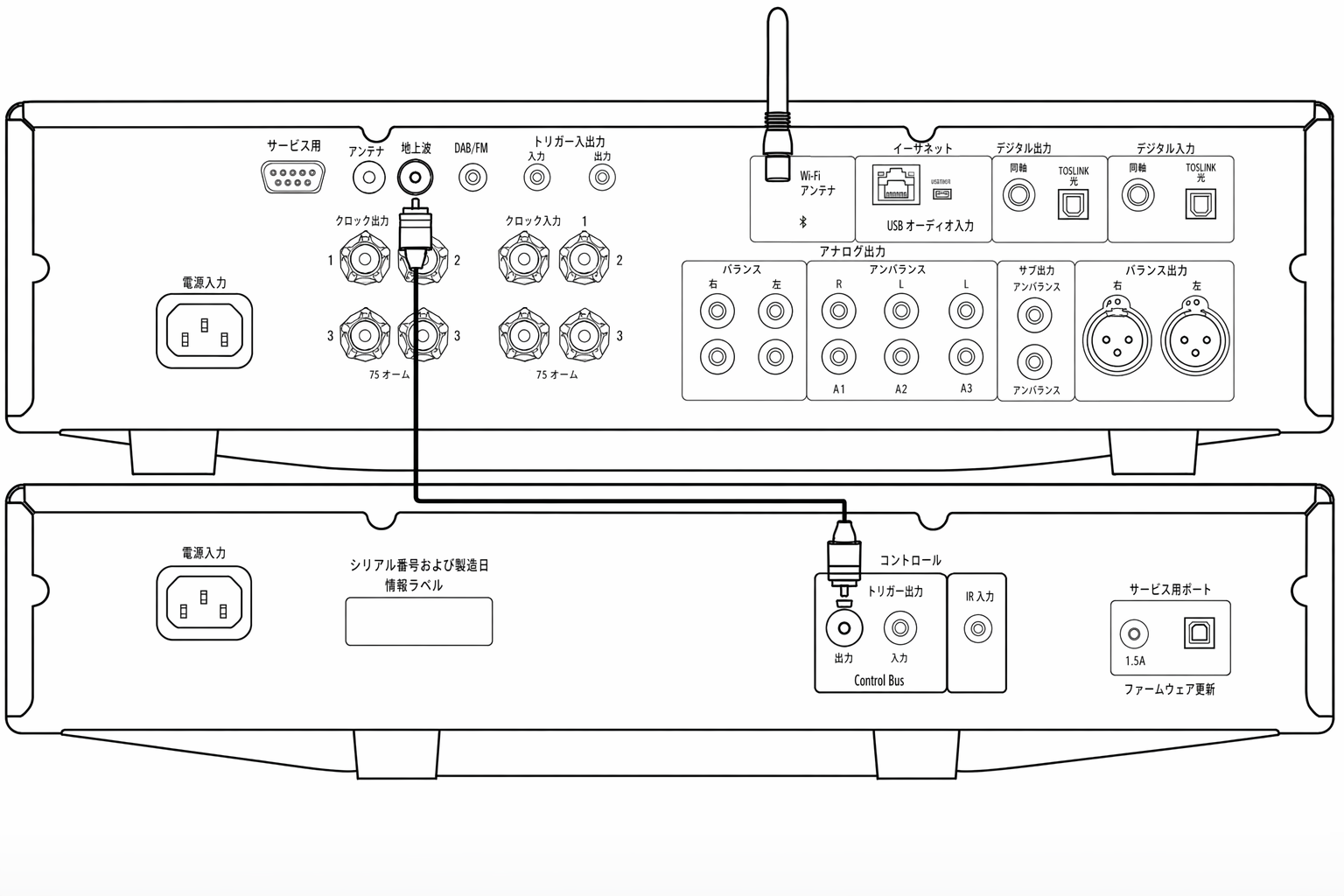
注:CXC および CXA にはいずれもオートパワーダウン(APD)機能があります。APD が有効な状態で、いずれかの機器が電源オンのまま操作されない場合、設定された APD 時間の経過後に自動で電源オフになります。その結果、コントロールバス接続を介して、接続されている他の機器もすべて電源オフになります。
Note: The CXC and CXA all have an Auto Power Down (APD) function. If APD is enabled and one of the devices is switched on but inactive, the device will automatically power down after the selected APD time. This will then switch off all the other connected devices, due to the Control Bus connection.
機器を自動でスタンバイに移行させたくない場合は、各機器の APD 機能を無効にすることをおすすめします。
If you don't want the devices to go into standby automatically, we would recommend disabling the APD feature on each device.
トラブルシューティング
電源が入らない • AC 電源コードが確実に接続されていることを確認してください。 • プラグが壁のコンセントに完全に差し込まれ、コンセントのスイッチがオンになっていることを確認してください。 • 電源プラグまたはアダプターのヒューズを確認してください。
There is no power• Ensure that the AC power cord is connected securely.• Ensure the plug is fully inserted into the wall socket and is switched on.• Check fuse in the mains plug or adaptor.
プレーヤーがディスクを読み取らない • ディスクが裏返しにセットされていないか確認してください。 • ディスクの傷や汚れがひどくないか確認してください。
The player will not read the disc• Check the disc is not loaded upside down.• Check that the disc is not too scratched or dirty.
音が出ない • アンプが正しく設定されていることを確認してください。 • インターコネクトケーブルが正しく差し込まれていることを確認してください。
There is no sound• Ensure that the amplifier is set correctly.• Check that the interconnects are inserted correctly.
ディスクの音飛びが発生する • ディスクの傷や汚れがひどくないか確認してください。 • プレーヤーを安定した場所に設置し、振動の影響を受けていないことを確認してください。
The disc is skipping• Check that the disc is not too scratched or dirty.• Ensure the player is on a firm surface and not subject to vibrations.
スピーカーからハム音が出る • すべてのケーブル接続が確実であることを確認してください。
There is a hum coming from the speakers• Ensure that all cable connections are secure.
リモコンが動作しない • 電池が消耗していないか確認してください。 • リモコン受光部を遮るものがないことを確認してください。
The remote will not function• Check that the batteries have not expired.• Ensure that nothing is blocking the remote sensor.
技術仕様
相関ジッター合計 <0.2ns
Total correlated jitter<0.2ns
S/PDIF および TOSLINK 光出力インピーダンス <75 Ω
S/PDIF and TOSLINK optical output impedance<75 Ohms
デジタルオーディオ出力 S/PDIF 同軸および TOSLINK 光
Digital audio outputsS/PDIF coaxial and TOSLINK optical
最大消費電力 25W
Maximum power consumption25W
スタンバイ時消費電力 <0.5W
Standby power consumption<0.5W
外形寸法(H × W × D) 85 × 430 × 315mm(3.3 × 16.9 × 12.4 インチ)
Dimensions (H x W x D)85 x 430 x 315mm (3.3 x 16.9 x 12.4")
質量 4.3kg(10.3 ポンド)
Weight4.3kg (10.3lbs)
よくあるご質問(FAQ)
CXC で SACD や MP3/WMA ディスクを再生する方法は?
CXC では SACD、MP3、WMA ディスクは再生できません。CXC は Azur シリーズの CD プレーヤーと同じ S3 サーボを採用しており、CD 再生に特化して最適化されています。
It is not possible to play SACD, MP3 or WMA discs on the CXC. The CXC uses the same S3 servo as our Azur CD players and is optimised for CD playback only.
CXC にアナログ音声出力がないのはなぜですか?
一般的な CD プレーヤーでは、CD のデジタル情報を読み取り、プレーヤー内部の DAC(デジタル/アナログコンバーター)を通します。変換後のアナログ信号は、通常 RCA 接続でアンプに出力されます。
In a 'normal' CD player, the CD's digital information is read and passed through a DAC (Digital to Analogue Converter) inside the CD player. The resulting analogue signal is then output to the amplifier, usually via RCA connection.
CXC は CD トランスポートです。つまり、CXC は CD を再生してディスクからデジタル情報を取り出し、S/PDIF 同軸または TOSLINK 接続でデジタル信号のまま出力します。
The CXC is a CD Transport. This means that the CXC plays the CD and extracts the digital information from the CD disc and outputs it digitally, via S/PDIF Coaxial or Toslink connection.
当社の CX シリーズアンプ(CXA61/81)は高品位な ESS Sabre DAC を搭載しています。そのため、CD トランスポートからデジタル信号を出力し、デジタルからアナログへの変換はアンプ側で行うことをおすすめします。
As we use high-quality ESS Sabre DACs inside our CX Series amplifiers (CXA61/81), we recommend outputting a digital signal from the CD Transport and allow the digital to analogue conversion take place in the amplifier instead.