
取扱説明書
MXW70
はじめに
最終更新日: 2025年5月16日 05:04。リビジョン #10022
Last updated: May 16, 2025 05:04. Revision #10022
本ガイドは、本製品の設置と使用をできるだけ簡単に行えるよう作成しています。本書の情報は印刷時点で正確性を慎重に確認しています。ただし、Cambridge Audio は継続的な改善を方針としており、デザインおよび仕様は予告なく変更する場合があります。
This guide is designed to make installing and using this product as easy as possible. Information in this document has been carefully checked for accuracy at the time of printing; however, Cambridge Audio’s policy is one of continuous improvement, therefore design and specifications are subject to change without prior notice.
本書は著作権で保護された独自情報を含みます。無断転載を禁じます。本マニュアルのいかなる部分も、製造元の事前の書面による許可なく、機械的・電子的その他の手段や形式で複製することを禁じます。すべての商標および登録商標は、それぞれの所有者に帰属します。
This document contains proprietary information protected by copyright. All rights reserved. No part of this manual may be reproduced by any mechanical, electronic or other means, in any form, without prior written permission of the manufacturer. All trademarks and registered trademarks are the property of their respective owners.
©Copyright Cambridge Audio Ltd 2025.
©Copyright Cambridge Audio Ltd 2025.
このマニュアル内の画像の一部は、元の PDF から自動生成されたものです。自動処理の都合上、製品の細部や配線図などが実際と異なる場合があります。正確な形状・寸法・配線は、実機および製品ページの写真、同梱の正規マニュアル(英語版)をあわせてご確認ください。
MXW70 の付属品
MXW70 の箱には以下が同梱されています。
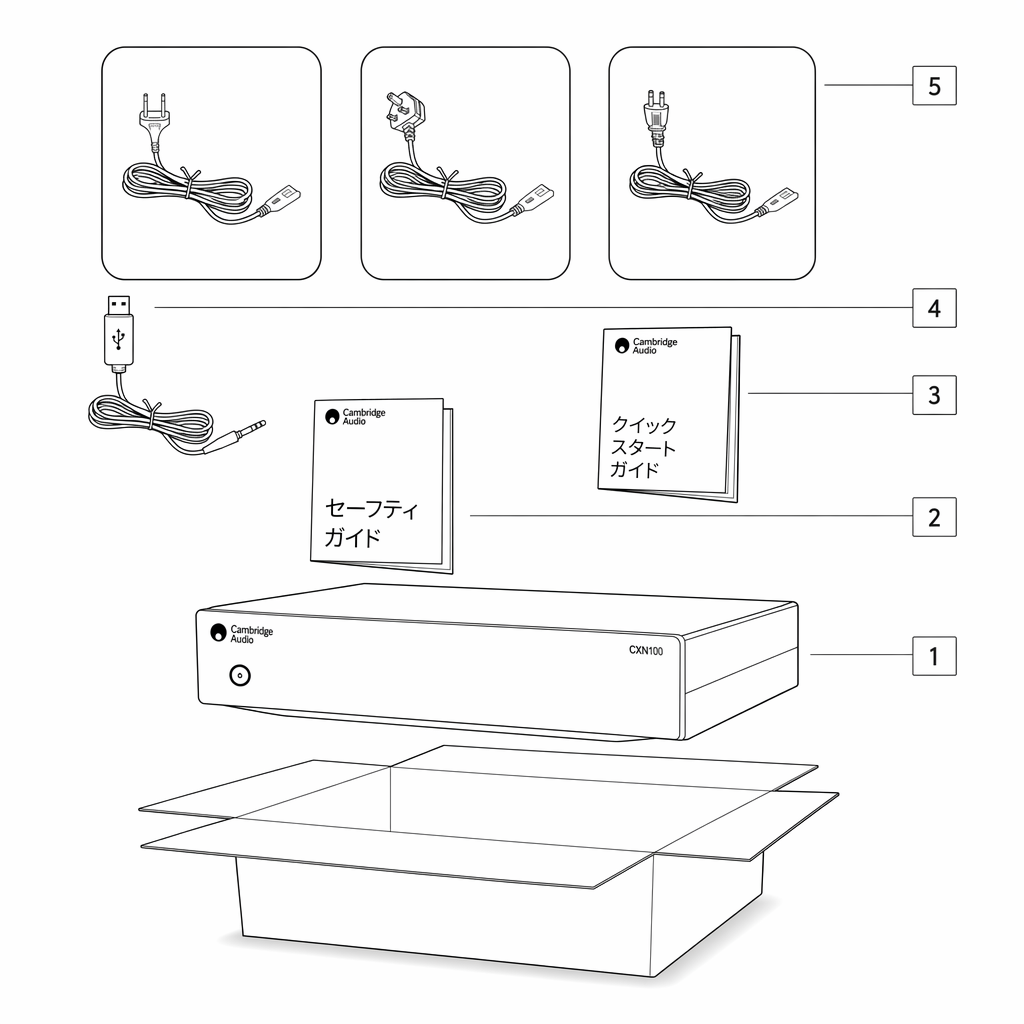
1. MXW70 パワーアンプ 2. クイックスタートガイド 3. 安全ガイド 4. トリガー入力ケーブル 5. UK 電源コード(MXW70 を購入した国による) EU 電源コード(MXW70 を購入した国による) CU 電源コード(MXW70 を購入した国による) JP 電源コード(MXW70 を購入した国による)
1. MXW70 Power Amplifier2. Quick start guide3. Safety guide4. Trigger in Cable5. UK power cord (Depending on which country the MXW70 was purchased in) EU power cord (Depending on which country the MXW70 was purchased in) CU power cord (Depending on which country the MXW70 was purchased in) JP power cord (Depending on which country the MXW70 was purchased in)
フロントパネル
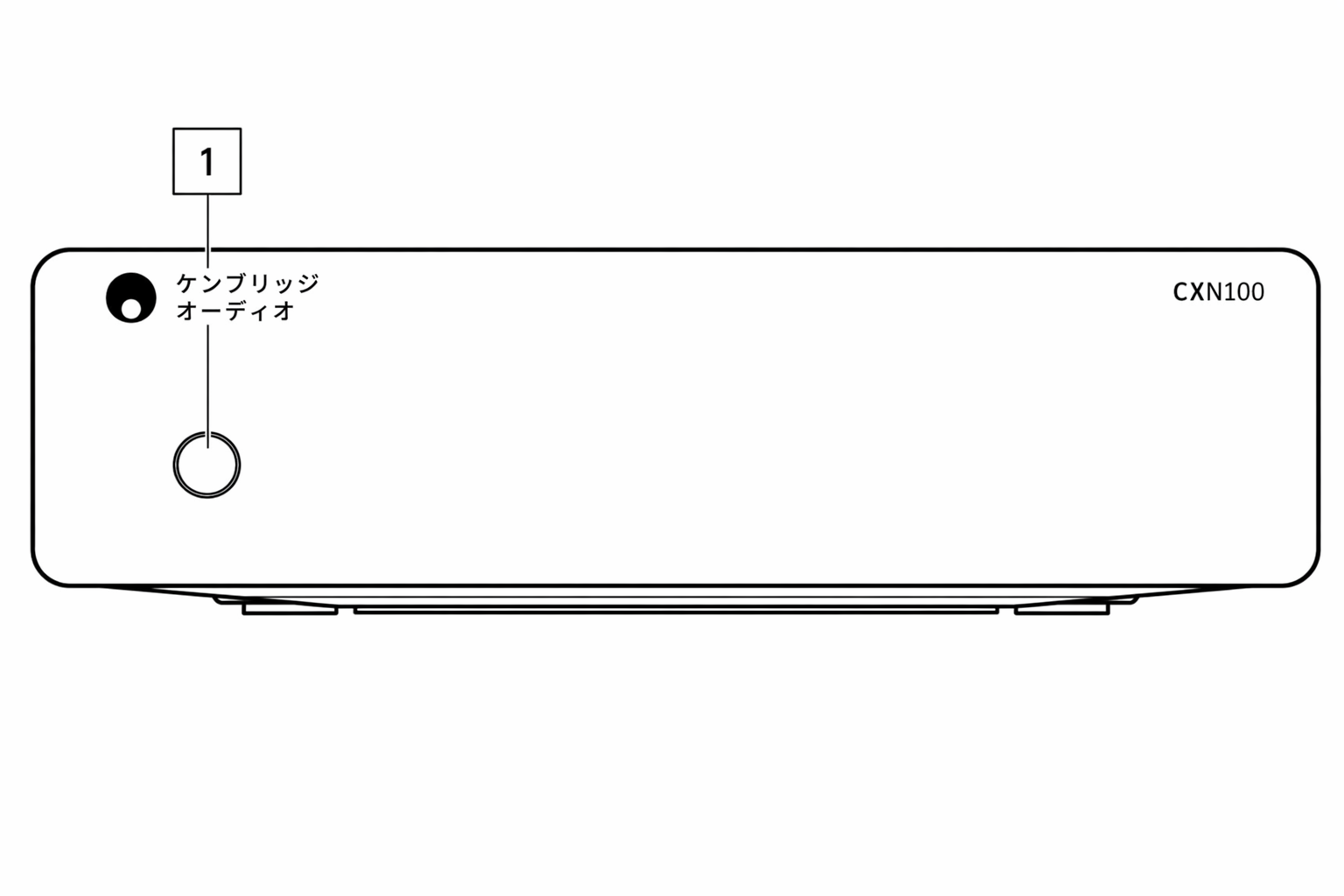
1. 電源ボタン 本機のスタンバイモード(電源 LED が暗く点灯)とオン状態(電源 LED が明るく点灯)を切り替えます。スタンバイモードは低消費電力モード(0.5W)です。ご使用にならないときは、スタンバイモードのままにしてください。 AUTO POWER DOWN(APD)
1. Power buttonSwitches the unit between Standby Mode (indicated by dim power LED) and On (indicated by bright power LED). Standby Mode is a lowpower mode (0.5 Watts) – The unit should be left in Standby Mode when not in use.AUTO POWER DOWN (APD)
本製品は 20 分間操作がないと自動的にスタンバイモードへ切り替わります。この機能の有効化・無効化については、本マニュアルの「Auto Power Down (APD)」セクションを参照してください。
The product will automatically switch to standby mode after inactivity of 20 minutes. To enable or disable this function, Refer to the “Auto Power Down (APD)' section of this manual for more information.
リアパネルの接続
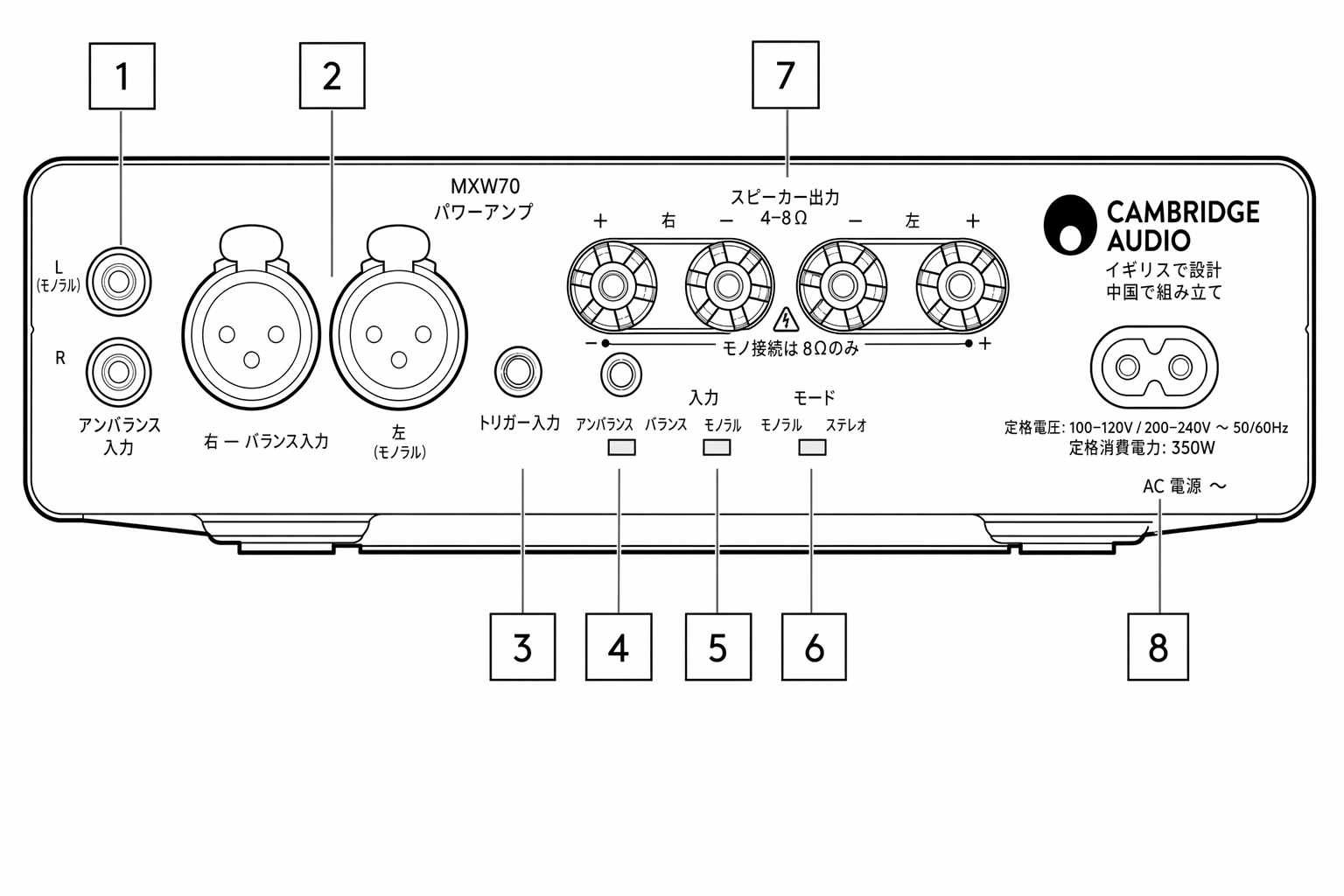
1. アンバランス入力 RCA 入力はアンバランスです。 注: モノラルモードでは、左(モノラル)チャンネルのみを接続します。モードスイッチは「Mono」モードに設定してください。詳しくは本マニュアルの「Mono connection」セクションを参照してください。
1. Unbalanced input.RCA input is unbalanced.Note: in mono mode, only the left (mono) channel needs to be connected, the Mode switch must be set to the “Mono” mode, Refer to the 'Mono connection' section of this manual for more information.
2. バランス入力 バランス XLR 接続に使用します。XLR 出力対応の機器と組み合わせる際、ケーブル内のノイズや干渉を抑えるため、長距離(2m を超える)配線にはバランス接続を推奨します。 注: モノラルモードでは、左(モノラル)チャンネルのみを接続します。モードスイッチは「Mono」モードに設定してください。
2. Balanced Input For use with balanced XLR connections. The balanced connection is recommended for long distances (>2m) as it helps reject noise and interference in the cable when used with other equipment that supports XLR out . Note: in Mono mode, only the left (mono) channel needs to be connected, the Mode switch must be set to the “Mono” mode.
3. トリガー入力 MXW70 はオーディオ機器やホームオートメーション機器のトリガー制御出力と接続できます。これにより MXW70 の電源状態を制御できます。入力レベルは 12V です。
3. Trigger inThe MXW70 can be connected to the trigger control output of audio or home automation equipment to control the power state of the MXW70. The input level should be 12V.
4. トリガーループ トリガーループはトリガー入力の 12V をそのまま伝達します。2 台目の MXW70 や他の機器を起動する用途に使えます。詳しくは本マニュアルの「Power syncing」セクションを参照してください。
4. Trigger loopThe trigger loop will transfer the 12V from the Trigger in, this can be used to turn on a second MXW70 or another device. Refer to the 'Power syncing' section of this manual for more information.
5. アンバランス / バランス入力ソーススイッチ - ソースをバランス XLR に接続するか、アンバランス RCA に接続するかによって選択します。
5. Unbalanced/Balanced input source switch - Select depending on whether a source is connected to the balanced XLR or unbalanced RCA input.
注: 正しい入力を選択しないとアンプから音が出ません。たとえばバランス入力にソースを接続している場合は、必ずバランス側のスイッチを選択してください。
Note: There will be no sound from the amp if the correct input isn’t selected. If a source is connected to the balanced input, for example, ensure that the balanced switch has been selected.
6. スピーカー出力モードスイッチ(Mono / Stereo) モードスイッチでモノラルとステレオを切り替えます。
6. Speaker-output Mode switch (Mono/Stereo)the Mode switch toggles the Mono or Stereo mode.
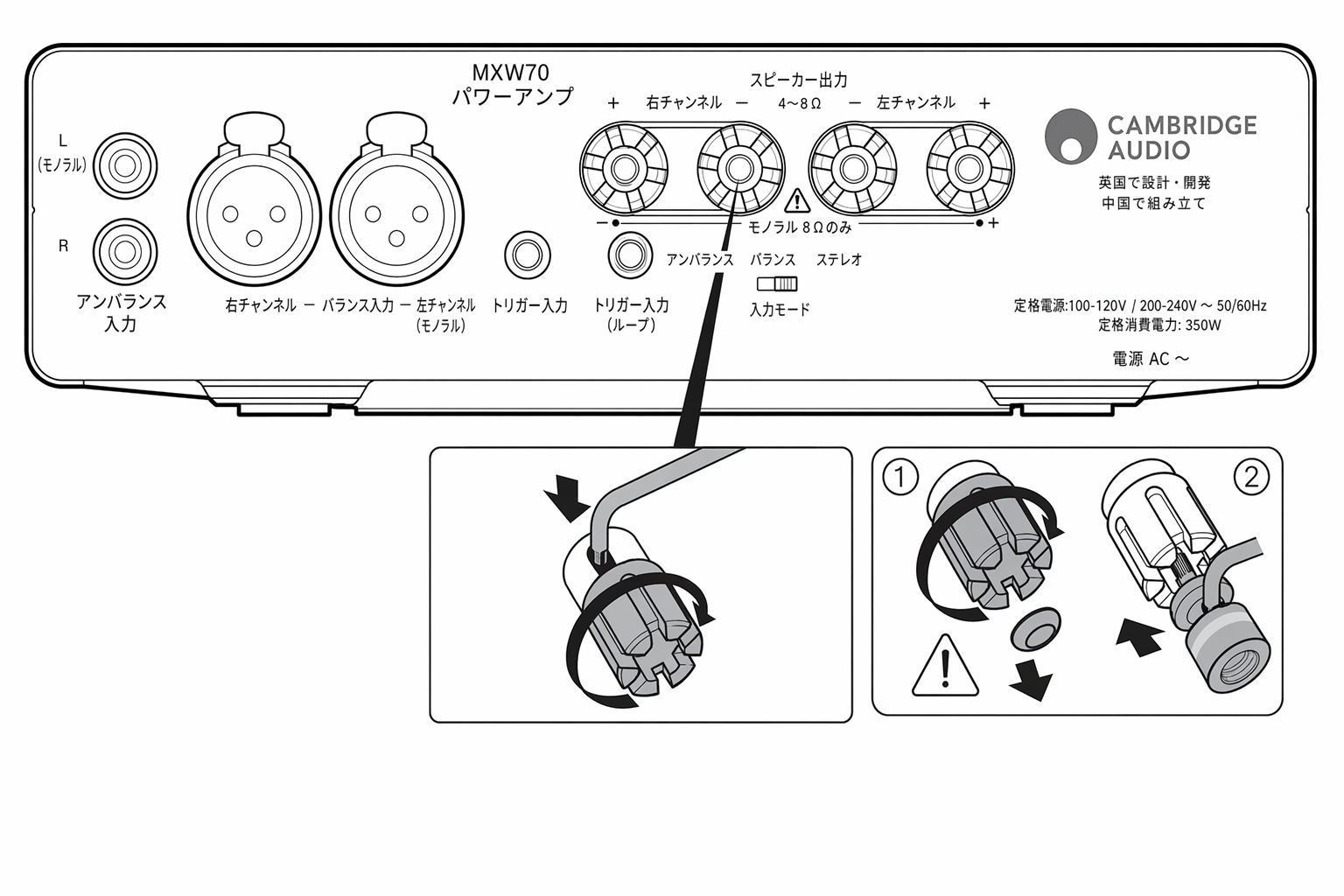
7. スピーカー端子 注: バナナプラグを使用する際は、プラグを挿す前にスピーカー端子をしっかり締め込んでください。
7. SPEAKER TERMINALSNote: When using a banana plug, make sure the speaker terminals are completely tightened before inserting the plug.
ステレオモードの場合
In Stereo mode
左チャンネルのスピーカーのケーブルを左側のプラス端子とマイナス端子に接続します。右チャンネルのスピーカーのケーブルは右側のプラス端子とマイナス端子に接続します。赤い端子がプラス出力、黒い端子がマイナス出力です。
Connect the wires from your left channel loudspeaker to the left positive and negative terminals and the wires from the right channel loudspeaker to the right positive and negative terminals. The red terminal is the positive output and the black terminal is the negative output.
スピーカー出力同士がはみ出たケーブル素線で短絡しないよう注意してください。確実な電気接続を確保するため、スピーカー端子は完全に締め込んでください。ネジ端子が緩んでいると音質に影響する場合があります。
Care should be taken to ensure no stray strands of wire short the speaker outputs together. Please ensure that the loudspeaker terminals have been tightened completely to provide a good electrical connection. It is possible for the sound quality to be affected if the screw terminals are loose.
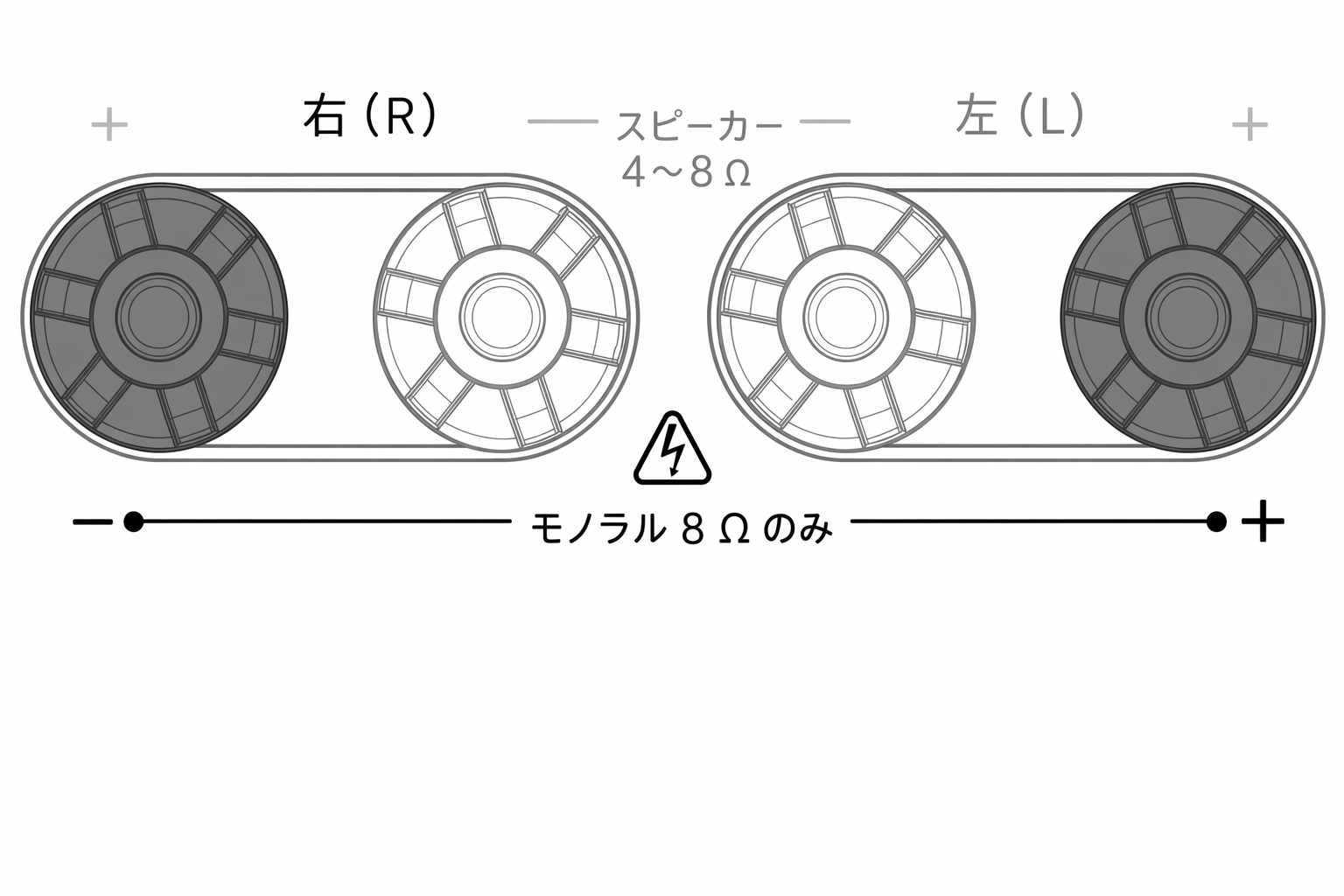
モノラルモードの場合
In Mono mode
注: 「Left」の赤い端子がプラス出力、「Right」の赤い端子がマイナス出力になります。
NOTE: the red terminal of the “Left” is the positive output, the red terminal of the “Right” is the negative output.
8. AC 電源ソケット アンプへのすべての接続が完了したら、AC 電源ケーブルを適切なコンセントに差し込み、電源を入れてください。これでアンプを使用できます。
8. AC POWER SOCKETOnce you have completed all connections to the amplifier, plug the AC power cable into an appropriate mains socket then switch on. Your amplifier is now ready for use.
接続方法
スピーカー
LOUDSPEAKERS
お使いのスピーカーのインピーダンスを確認してください。ステレオモードでは 4〜8Ω のスピーカーを使用できます。モノラルモードでは 8Ω スピーカーのみ対応しています。
Check the impedance of your speakers. You can use types with an impedance of between 4 and 8 Ohms in stereo mode. Only 8ohm loudspeaker is supported in mono mode.
赤いスピーカー端子がプラス (+)、黒いスピーカー端子がマイナス (-) です。各スピーカー側でも極性を正しく合わせてください。極性が逆になると音が弱くなり、低音の少ない位相の崩れた音になります。
The red coloured speaker terminals are positive (+) and the black speaker terminals are negative (-). Make sure the correct polarity is maintained at each speaker connector or the sound can become weak and “phasey” with little bass.
注: モノラルモードでは「Left」の赤い端子がプラス出力、「Right」の赤い端子がマイナス出力です。詳しくは本マニュアルの「Mono connection」セクションを参照してください。
Note: in the Mono mode, the red terminal of the “Left” is the positive output, the red terminal of the “Right” is the negative output.. refer to the 'Mono connection' section of this manual for more information.
裸線での接続
USING BARE WIRE CONNECTIONS
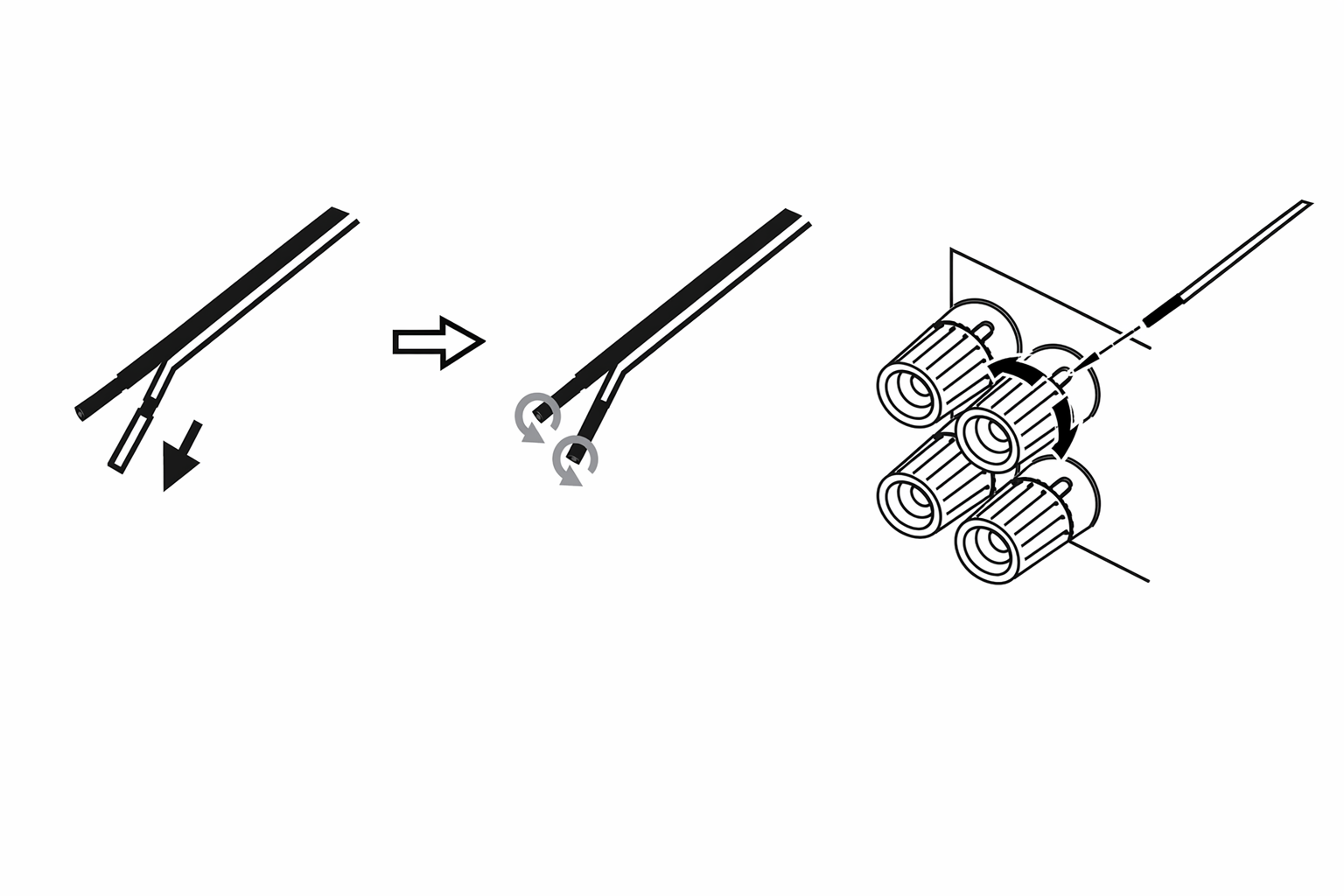
スピーカーケーブルの外側の被覆を約 10mm(3/8 インチ)以下剥いて準備します。10mm を超えると短絡の原因となります。素線がばらけないようしっかり撚り合わせてください。スピーカー端子を緩め、ケーブルを挿入し、端子を締めてケーブルを固定します。
Prepare the speaker cords for connection by stripping off approximately 10mm (3/8”) or less of the outer insulation. More than 10mm could cause a short circuit. Twist the wires tightly together so there are no loose ends. Unscrew the speaker terminal, insert the speaker cable, tighten the terminal and secure the cable.
注: すべての接続には市販のスピーカーケーブルを使用します。
Note: All connections are made using standard loudspeaker cable.
バナナプラグでの接続
USING BANANA PLUGS
当社製品では、確実な接続を行い、不要なノイズや干渉の原因となる素線のはみ出しを防ぐため、バナナプラグの使用を推奨します。
We recommend using Banana plugs with our units to establish a secure connection and ensure there are no loose strands of wire that may cause unwanted noise or interference.
下図のようにケーブルの外被を剥いて素線を撚り合わせたら、バナナプラグへ確実に取り付け、無理のない範囲で奥まで差し込んでください。
Once you have stripped the outer insulation of the cable and twisted the wires as indicated below, securely connect these to your banana plugs and push the plug in as far as possible without applying excessive force.
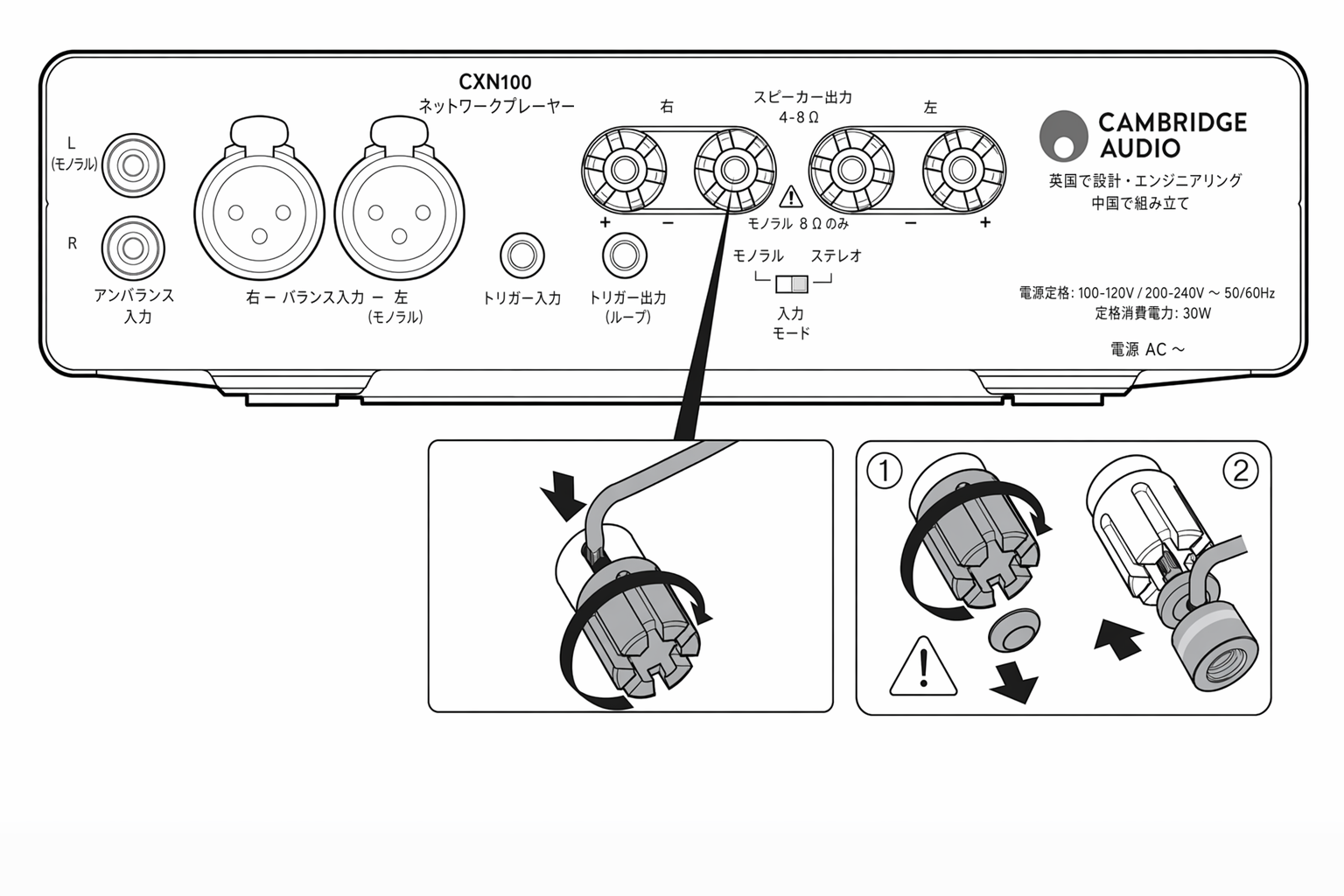
注: バナナプラグを使用する際は、先にスピーカー端子を完全に締め込んでから端子の「ピップ」を外し、バナナプラグを差し込んでください。
Note: When using a banana plug, make sure the speaker terminals are completely tightened before removing the "pip" from them, and then insert the banana plugs
ステレオ接続
STEREO CONNECTIONS
アナログ入力はプリアンプまたはインテグレーテッドアンプのプリアウトに接続します。下図はプリアンプからの基本的な接続例です。
The analogue inputs are to be connected to the Pre-Outs of a Preamplifier or Integrated amp. The diagrams below show the basic connection from a Preamplifier.
アンバランス入力
Unbalanced input
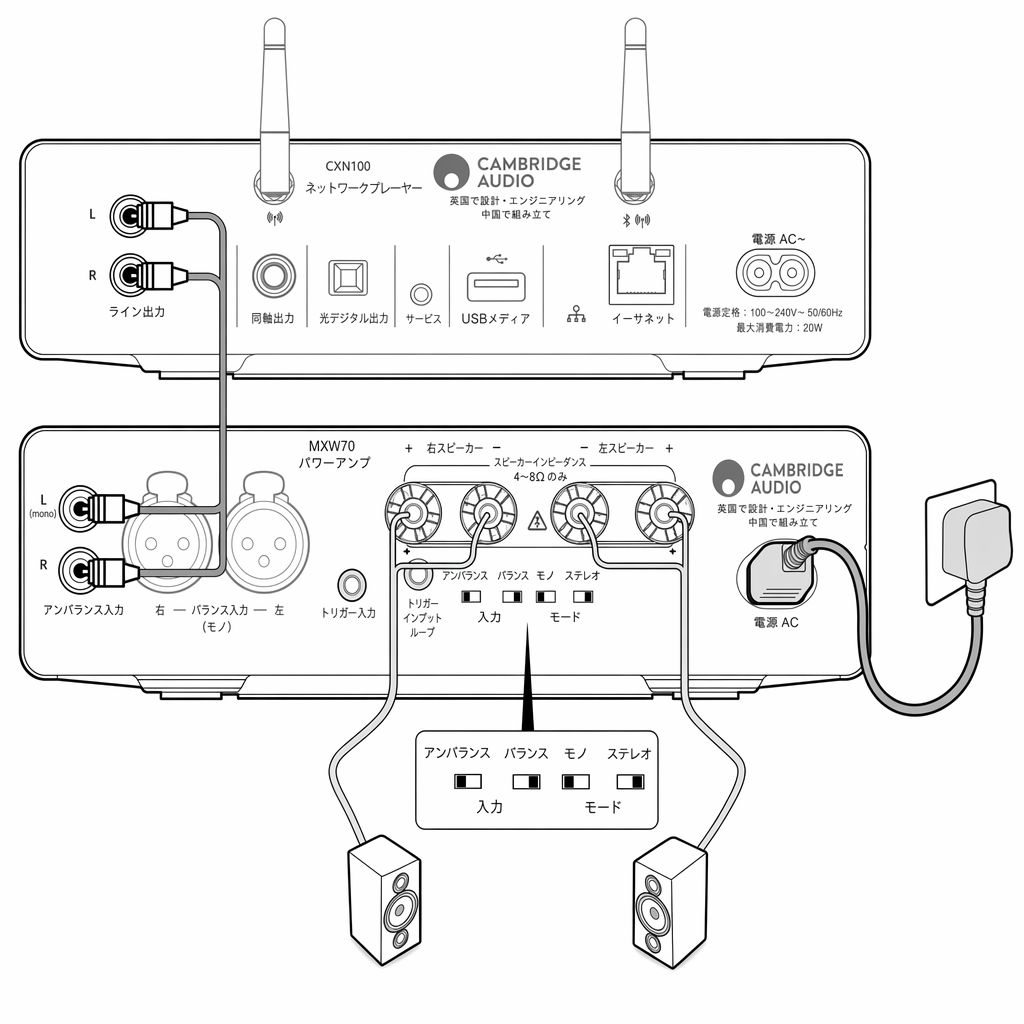
RCA ケーブルを使うと、MXW70 とアンバランスのアナログ接続ができます。RCA ケーブルを使う場合は、MXW70 の「Unbalanced」スイッチを選択してください。
Using RCA cables will enable an unbalanced analogue connection to your MXW70.If using RCA cables, ensure the ‘Unbalanced’ switch on your MXW70 is selected.
バランス入力
Balanced input
XLR ケーブルを使うと、MXW70 とバランスのアナログ接続ができます。特に長いケーブル長では、RCA アンバランス接続に比べてよりクリーンな信号経路を確保できます。ただし、短いケーブル長では音質向上の度合いは主観的です。
Using XLR cables will enable a balanced analogue connection to your MXW70. This will provide a cleaner signal path compared to an RCA unbalanced connection, especially over longer cable lengths, however the increase in audio quality they provide is subjective when used over shorter lengths.
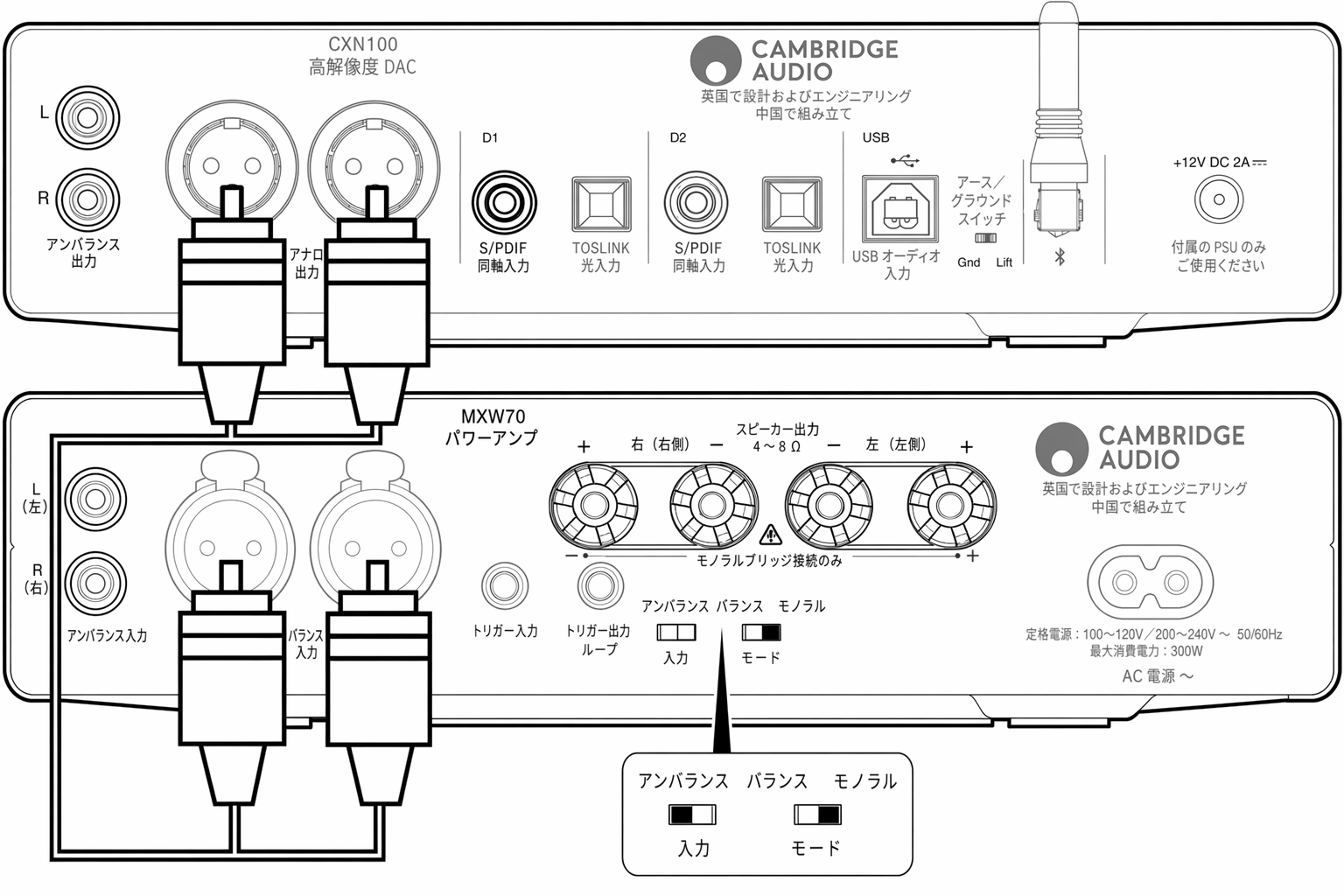
XLR ケーブルを使う場合は、MXW70 の「Balanced」スイッチを選択してください。
If using XLR cables, ensure the ‘Balanced’ switch on your MXW70 is selected.
電源連動
トリガー入力
TRIGGER IN
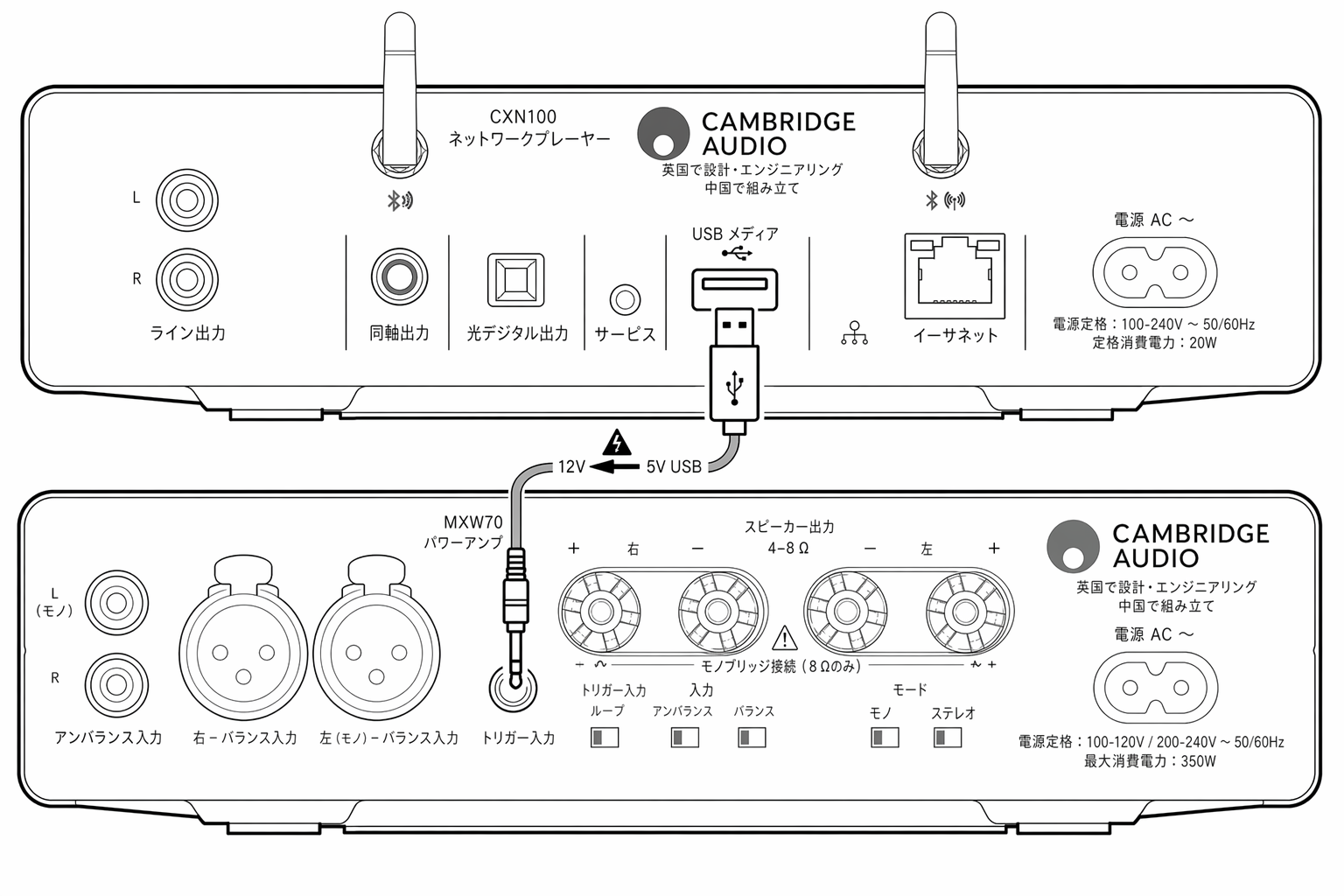
MXW70 には、オーディオ製品の USB A ポートに接続するトリガー入力ケーブルが付属しています。これにより MXW70 の電源オン/スタンバイを連動できます。お使いの製品の電源をオン/オフすると、MXW70 も合わせてオン/オフします。下図は MXN10 と MXW70 の間でトリガー入力ケーブルを使う例です。
The MXW70 is supplied with a Trigger in cable that connects to any audio product’s USB A port, allowing MXW70 to synchronize power on/standby. When you turn your product On/Off, the MXW70 will also power on/off. The diagram below shows how to use Trigger in cable between the MXN10 and MXW70.
トリガー入力ループ
TRIGGER IN LOOP
トリガーループはトリガー入力の 12V をそのまま伝達します。これにより 2 台目の MXW を起動できます。用途には市販の 3.5mm ジャックケーブル(モノラルまたはステレオ)を使用できます。
The trigger loop will pass the 12V from the Trigger in, so this can be used to turn on the second MXW.A standard 3.5mm jack cable (mono or stereo) can be used for the purpose.
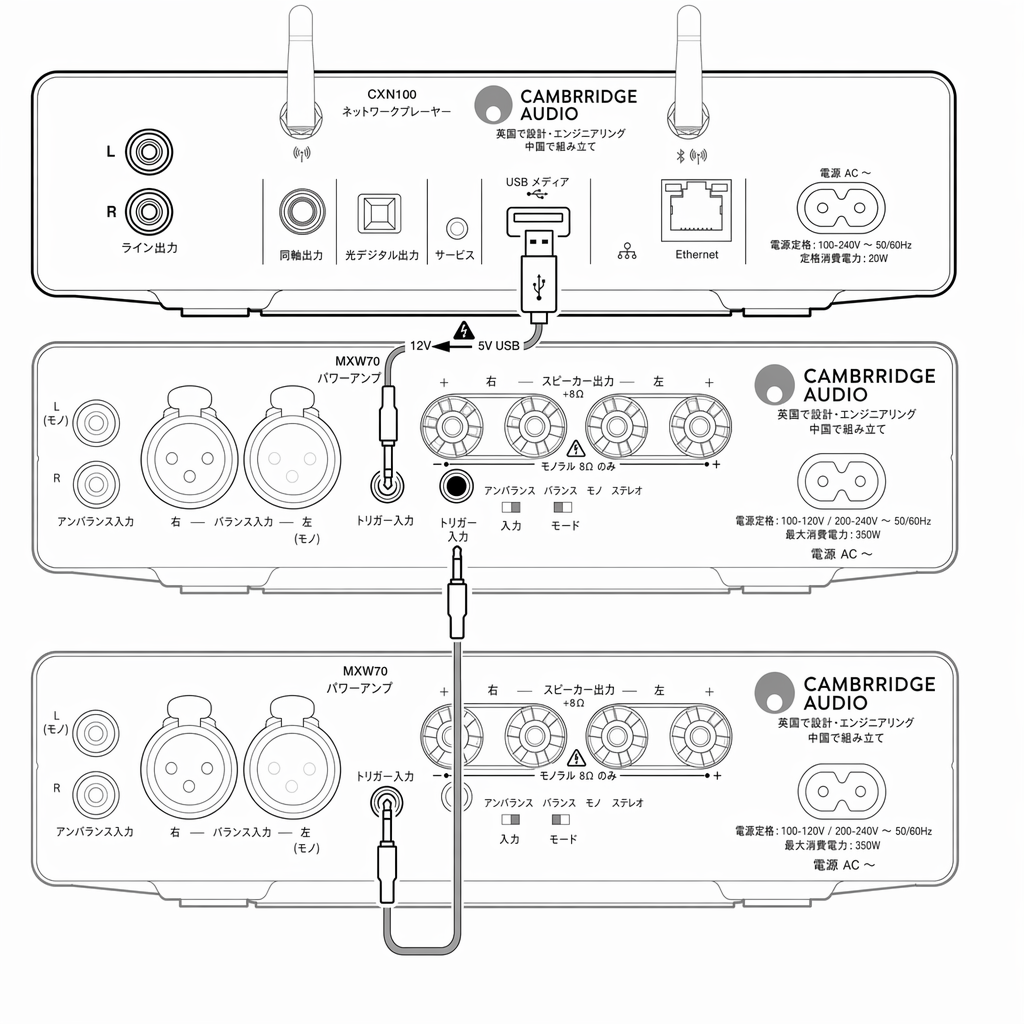
注: トリガー入力ループはトリガー出力とは異なります。MXW70 はトリガー入力ループで 12V を発生させません。トリガー入力ループを使うには、トリガー入力に外部ソースを接続する必要があります。
NOTE: Trigger In Loop is different from a Trigger Out connection. MXW70 does not generate 12V on Trigger In Loop.An external source connected to Trigger In is required to use Trigger In Loop

モノラル接続
モノラルモードでは、一方のパワーアンプで左スピーカーを駆動し、もう一方のパワーアンプで右スピーカーを駆動できます。
Mono mode allows you to drive the left speaker by one power amplifier and the right speaker by another power amplifier.

パワーアンプは、プリアンプ(可変出力)モードの機器から制御する必要があります。そうしないと最大音量で出力され、スピーカーを損傷するおそれがあります。
Power Amplifiers must be controlled by a product in pre-amp (variable output) mode. Otherwise you risk maximum volume output which may damage your speakers.
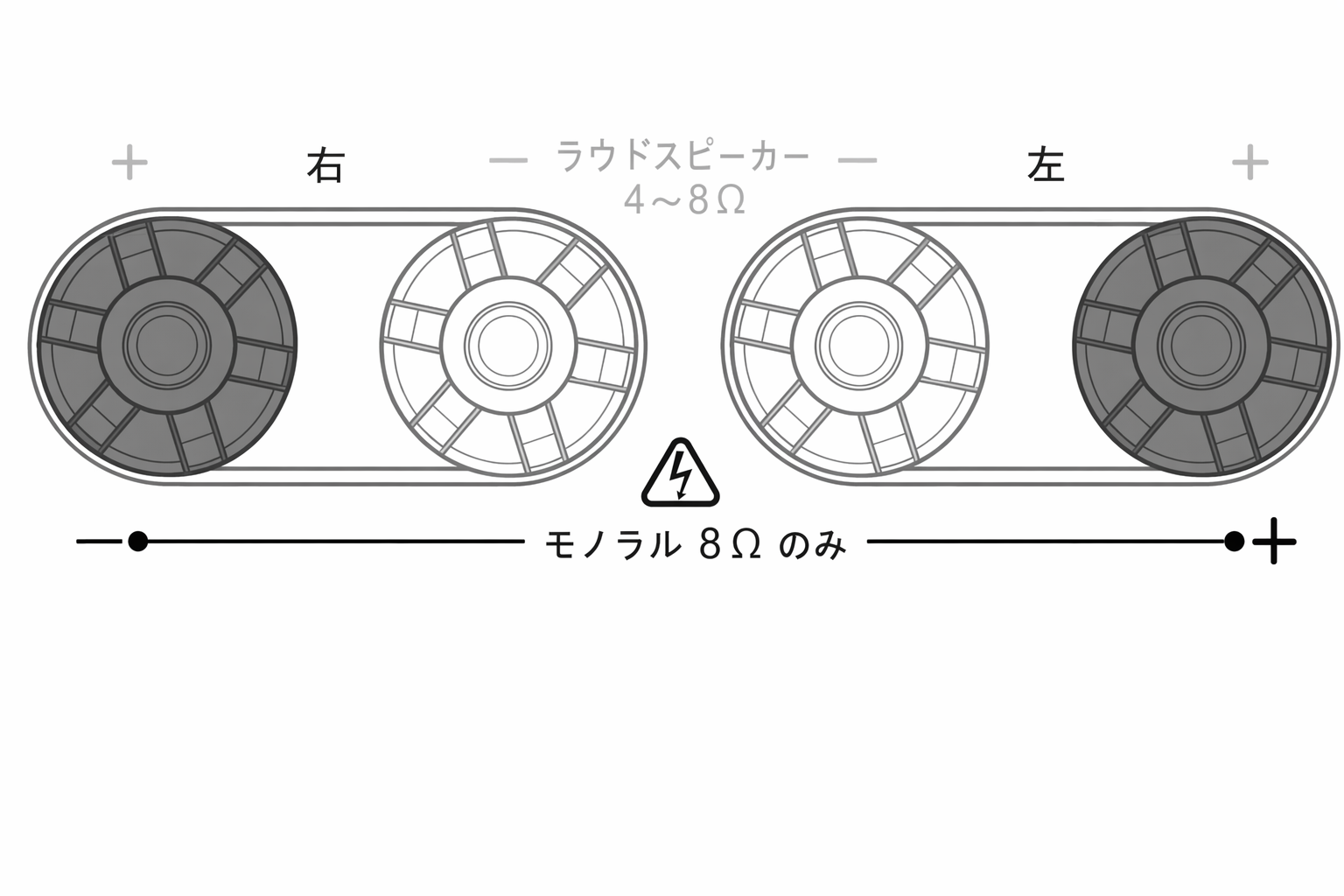
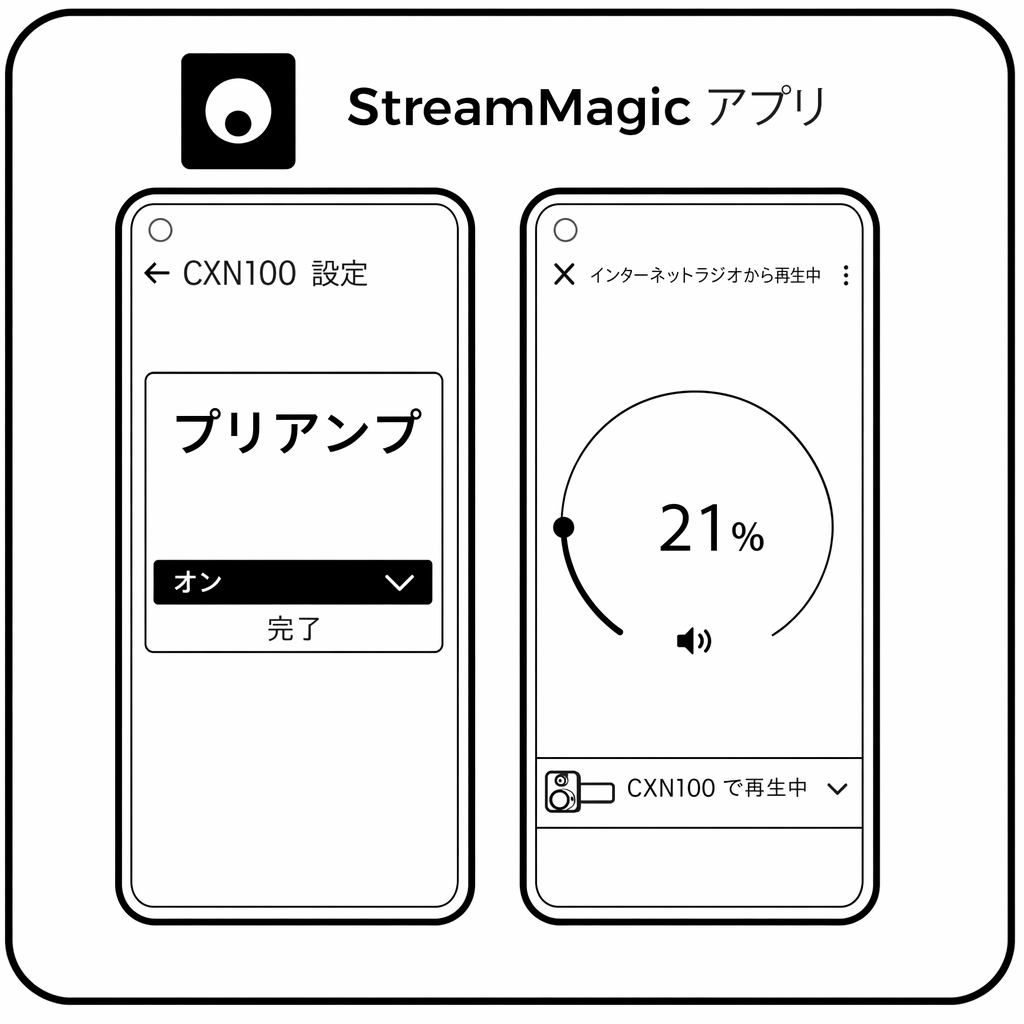
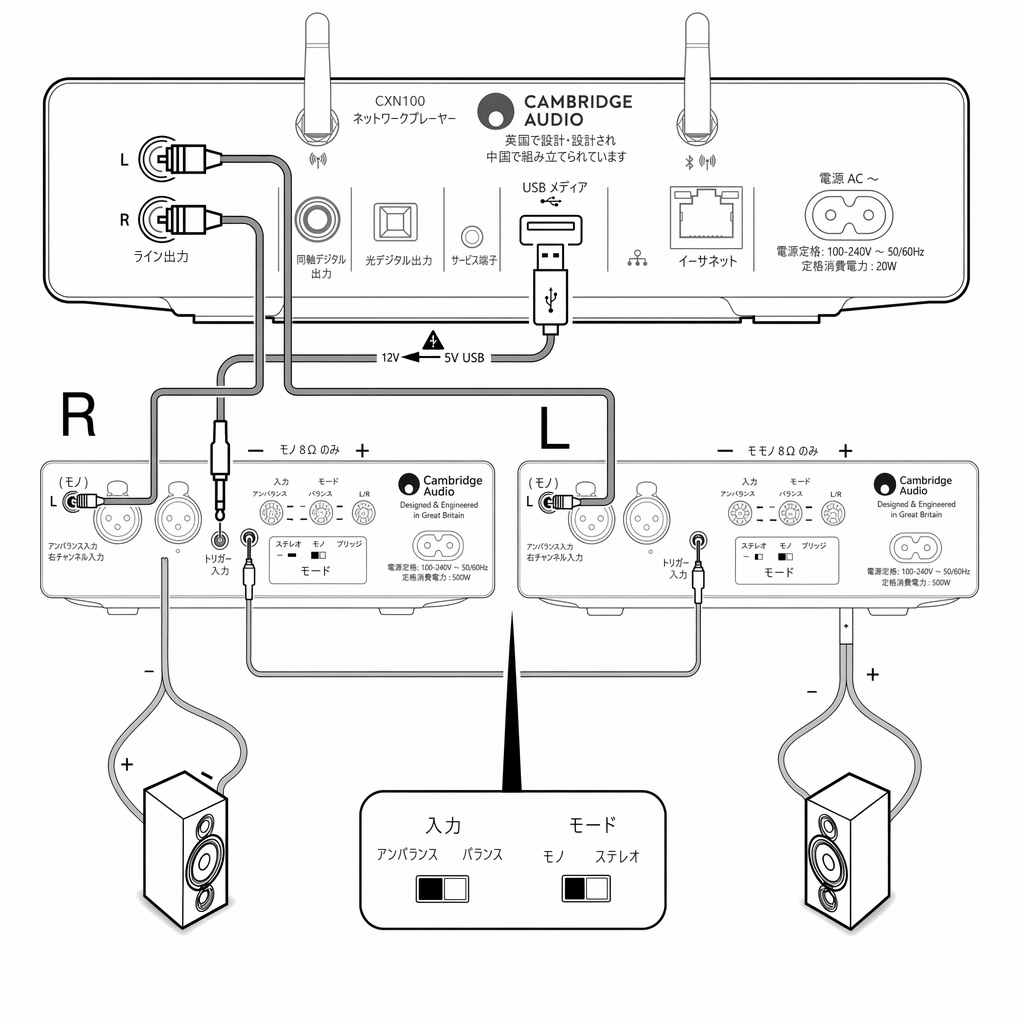
モノラルモードでのアンバランス接続 1. 下図は MXN10 に MXW70 を 2 台アンバランス接続で駆動する例です。 2. モノラルモードでは 8Ω のみ対応し、「Right」の赤い端子がマイナス出力となります。 3. 音量が連動して増減するよう、StreamMagic アプリでプリアンプモードをオンにしてください。 4. モードスイッチをモノラルに設定し、アンバランス側のスイッチが選択されていることを確認してください。
Unbalanced connection in mono mode1.The diagram below shows how to drive a pair of MXW70's connected to a MXN10 using an unbalanced connection.2. In the Mono mode, only 8ohm is supported and the red terminal of the “Right” is the negative output. 3. Turn on the Pre-Amp mode in the StreamMagic app, to ensure the volume increases/decreases in sync.4. Set the Mode switch in Mono mode and ensure that the unbalanced switch has been selected.
モノラルモードでのバランス接続
Balanced connection in mono mode
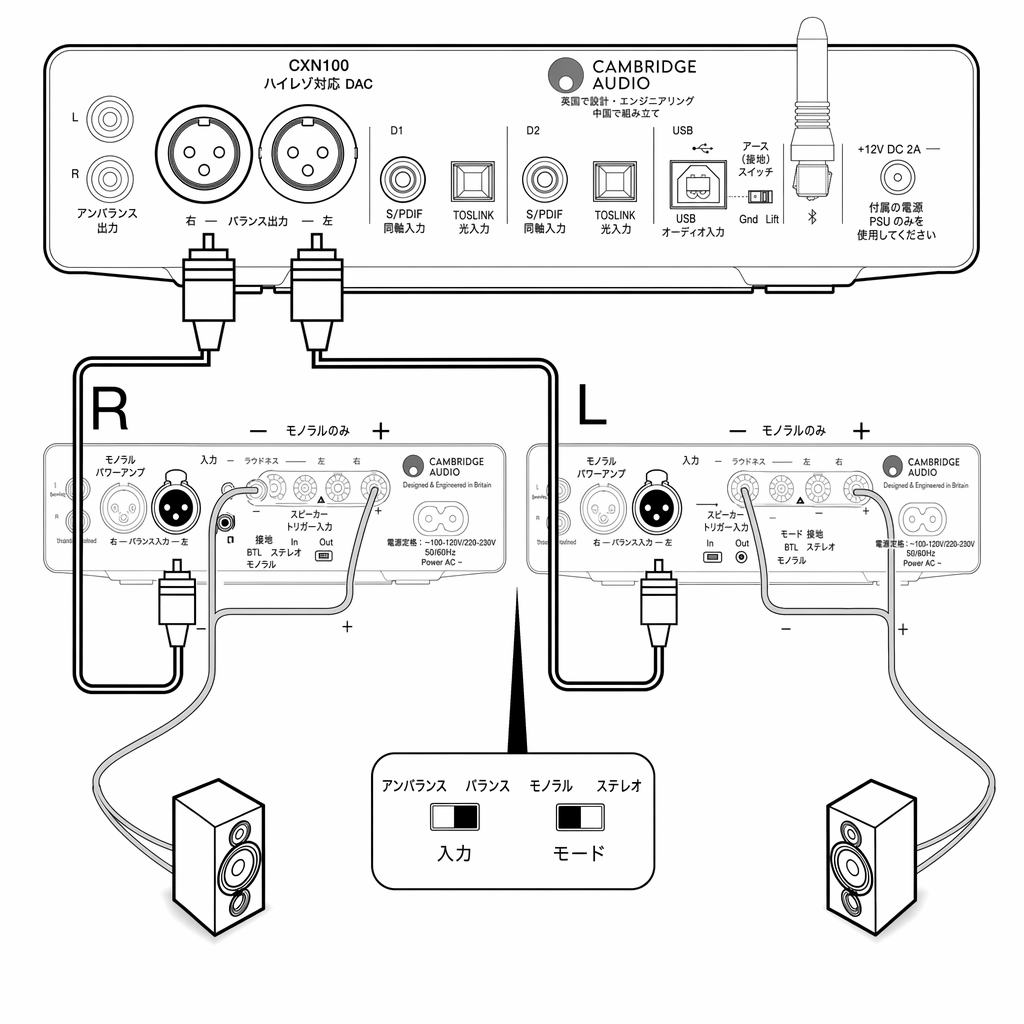
下図は DacMagic200M に MXW70 を 2 台バランス接続で駆動する例です。モードスイッチをモノラルに設定し、バランス側のスイッチが選択されていることを確認してください。
The diagram below shows how to drive a pair of MXW70's connected to a DacMagic200M using the balanced connection.the Mode switch in Mono mode and ensure that the balanced switch has been selected.
詳細設定
自動電源オフ(APD)
Auto Power Down (APD)
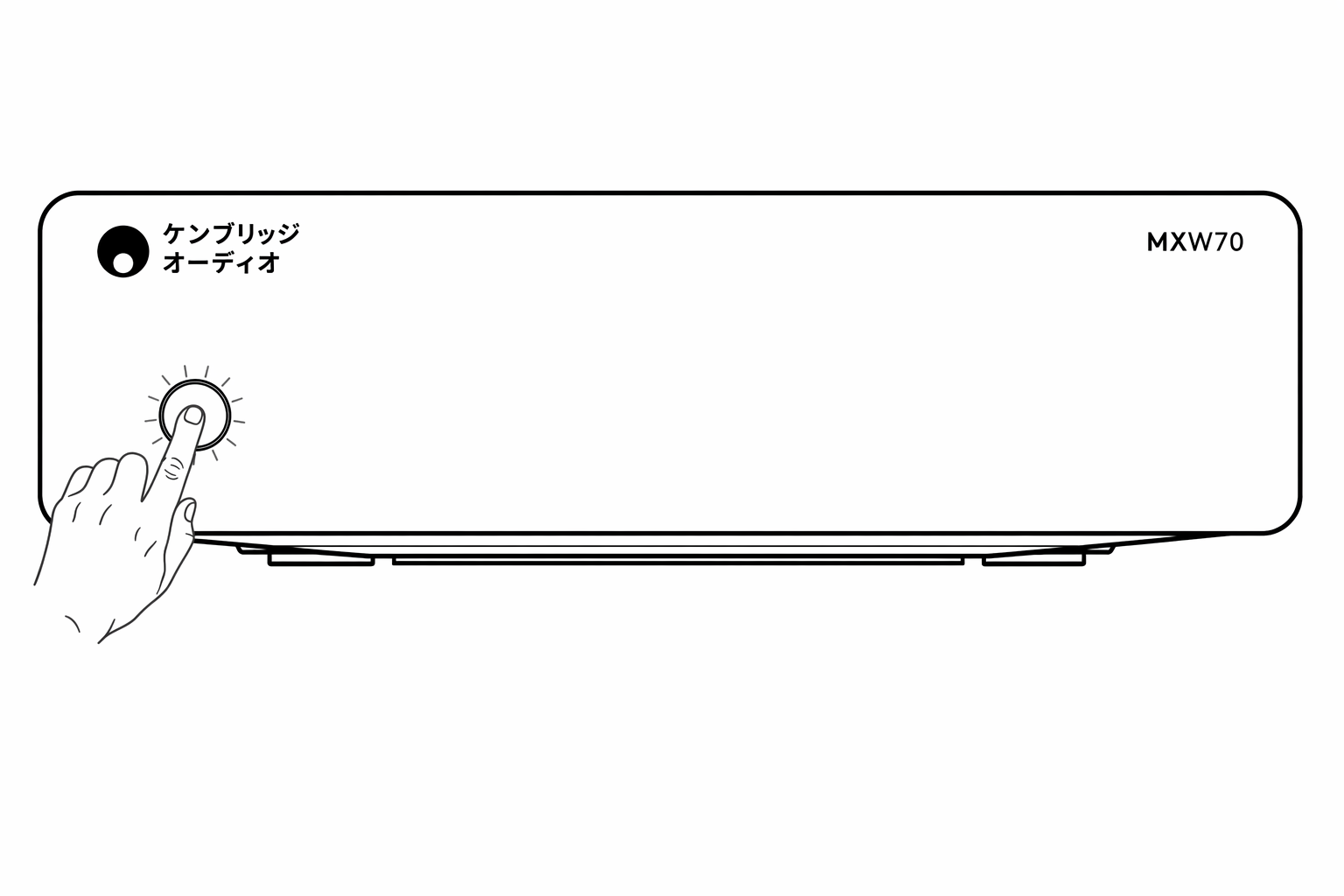
MXW70 は APD が有効な状態で出荷されます。20 分間オーディオ信号を検出しないと、本機は自動的にスタンバイ状態へ切り替わります。この機能を無効化または再度有効化するには、以下の手順を参照してください。
The MXW70 arrives with APD enabled, and this will automatically switch the unit to standby if no audio signal is detected for 20 minutes. To disable, or re-enable this function then please see the below instructions.
APD を無効にする
Disable APD
注: MXW70 がスタンバイ状態であることを確認してください。スタンバイ LED のみが暗く点灯している状態です。 スタンバイボタンを 5 秒間長押しします。 赤と白の LED が交互に 5 回点滅し、その後スタンバイ状態に戻ります。
Note: Please ensure that the MXW70 is in standby, which is indicated by only the standby LED being dim .Press and hold the Standby button for 5 seconds.Will blink alternately red-white LED for five times and then go back to the standby state
APD の有効化 / 工場出荷時リセットを行う
Enable APD/To perform a factory rest
注: APD リセットや工場出荷時リセットを行う際は、MXW70 の AC 電源ケーブルを抜いてスタンバイ LED が消灯するのを待ってから、AC 電源を差し込んでください。
Note: Please ensure the AC power cable of MXW70 is unplugged and wait for the standby LED to turn off before plugging in the AC power to perform APD reset or factory reset.
APD を有効にする(初期設定)
Enable APD (default)
AC 電源を差し込みながらスタンバイボタンを 5 秒間長押しします。赤と白の LED が交互に 5 回点滅し、その後スタンバイ状態に戻ります。
Press and hold Standby button for 5 seconds while plugging in AC power Will blink alternately red-white LED for five times and then go back to the standby state
工場出荷時リセットを行うには
To perform a factory reset
AC 電源を差し込みながら、赤と白の LED が交互に点滅するまでスタンバイボタンを長押しします。* APD 機能が有効になります。
Press and hold standby button while plugging in AC power until blink alternately red-white LED.* APD function will enable.
保護回路
MXW70 にはアンプ保護回路を搭載しており、過熱、DC オフセット、クリッピング、電源異常を検出します。いずれかの異常を検出すると、ボタンの LED が赤く点滅します。
The MXW70 includes Amplifier Protection Circuitry to detect faults with Over Temperature, DC offset, Clipping and Power supply fault. If any of these faults are detected the button LED will blink red.
ボタンを 1 回押すと保護表示が解除されます。異常を取り除いた後、もう一度押すと本機が再度オンになります。
Press the button once to disable the protection indication, and press again to turn unit back on, when the fault has been removed.
DC
DC
赤 1 回の短い点滅に続いて白の点灯で示されます。
This is indicated by 1 short red blink followed by solid white.
内部の異常でアンプ出力が高い一定電圧(DC)になった場合、MXW70 はスピーカー保護を行います。稀な障害ですが、検出することでスピーカーの損傷を防ぎます。
MXW70 offers loudspeaker protection if the output of the amplifier goes to a high constant voltage (DC) because of some internal fault. This is a rare fault, although detecting it will protect your loudspeakers from damage.
この異常が発生した場合は、お買い上げの販売店または当社サポートチーム(https://www.cambridgeaudio.com/contact)までお問い合わせください。
If this fault occurs, please contact your dealer for service or our support team https://www.cambridgeaudio.com/contact
過熱
Over Temperature
赤 2 回の短い点滅に続いて白の点灯で示されます。
This is indicated by 2 short red blinks followed by solid white
過熱は、大音量、低インピーダンスのスピーカー、換気不足が重なると発生します。内部温度が高くなると、アンプは損傷を防ぐため自動的に異常モードへ切り替わります。
Over temperature can be caused by a combination of high listening levels, low impedance speakers and insufficient ventilation. If the internal temperature reaches a high level, the amplifier will automatically switch into a fault mode to protect itself from damage.
スピーカーのインピーダンスが低いと、アンプの負荷が増すため温度上昇が早くなります。アンプを密閉されたキャビネットに設置している場合、短い再生時間でも過熱検出が作動・再作動することがあります。
If the loudspeaker impedance is low, the temperature of the amplifier may rise faster as the amplifier is working harder.If the amplifier is mounted in a closed cabinet, the over temperature detection may activate/reactivate after a short listening time.
通常動作に戻す前に、本機を 5 分間放置して冷却してください。選択している MXW70 の動作モードにスピーカーのインピーダンスが適合しているか確認してください。また、必要な対流冷却を確保するため、本機の周囲に少なくとも 15cm の空間を空けてください。内部温度が安全なレベルに達するまでは、スタンバイボタンを押しても本機は動作を再開しません。
Leave the unit for 5 minutes to cool down before resuming normal operation. Check if the loudspeaker impedance is suitable for the selected MXW70 operation mode, and also make sure there’s at least 15cm room all around the unit to allow the necessary convection cooling.The unit will not resume operation even when pressing the standby button if the internal temperature hasn’t reached a safe level yet.
電源異常
Power Supply Fault
赤 3 回の短い点滅に続いて白の点灯で示されます。
This is indicated by 3 short red blinks followed by solid white.
まれに内部電源に異常が発生する場合があります。本機の電源が入っているときに電源コードを抜いた場合や、突然の停電時にも起こる可能性があります。
In the unlucky event that the internal power supply becomes faulty. this can also happen when removing the power cord whilst unit is on, or if there’s a sudden power outage.
症状が続く場合は、お買い上げの販売店または当社サポートチーム(https://www.cambridgeaudio.com/contact)までお問い合わせください。
If the issue persists, please contact your dealer for service or our support team https://www.cambridgeaudio.com/contact
クリッピング
Clipping
赤 4 回の短い点滅に続いて白の点灯で示されます。
This is indicated by 4 short red blinks followed by solid white.
大音量の音楽のトランジェントでは瞬間的にクリッピングが起きることがあるため、本機はごく短時間の出力クリッピングを許容します。このとき赤いランプが速く点滅します。この場合は、ソースの音量を下げることを推奨します。クリッピング状態が続く場合、本機はスピーカーの損傷を防ぐため自動的にシャットダウンします。
The unit will allow output clipping for a very short time, as this might occasionally happen during loud music transients. Red light will flash quickly. In this case it is recommended to reduce the volume of the source.If clipping condition is persistent, then the unit will automatically shutdown to prevent loudspeaker damage.
トラブルシューティング
電源が入らない
There is no power
- AC 電源コードがしっかり接続されているか確認してください。
- プラグがコンセントに奥まで差し込まれ、スイッチが入っているか確認してください。
- 電源プラグまたはアダプターのヒューズを確認してください。
音が出ない
There is no sound
- 本機がスタンバイモードになっていないか確認してください。
- ソース機器が正しく接続されているか確認してください。
- スピーカーが正しく接続されているか確認してください。
- バランス / アンバランススイッチで正しい入力が選択されているか確認してください。
- モノラル / ステレオスイッチで正しいモードが選択されているか確認してください。
- 可能であれば、別のインターコネクトケーブルやスピーカーケーブルを試してください。
- ソース機器の音量がミュートになっていないか確認してください。
- 別のソース機器でも確認してください。
片方のチャンネルから音が出ない
There is no sound on one channel
- スピーカーの接続を確認してください。
- インターコネクトを確認してください。
低音が弱い、またはステレオイメージがぼやける
There is weak bass or diffused stereo imaging
- スピーカーが逆相で接続されていないか確認してください。
大きなブーンという音やハム音が出る
There is a loud buzz or hum
- インターコネクトに緩みや不良がないか確認してください。
LED スタンバイボタンが赤く点滅する
The LED standby button is flashing red
- 「Protection Circuitry」セクションのトラブルシューティング手順を確認してください。
仕様
最終更新日: 2025年6月10日 05:05。リビジョン #10014
Last updated: June 10, 2025 05:05. Revision #10014
連続出力:
Continuous power output:
- 2 x 70W RMS(8Ω)
- 2 x 125W RMS(4Ω)
- 1 x 250W RMS(8Ω、モノラル)
全高調波歪率(無加重):
THD (unweighted):
- 0.015% 未満(5W / 8Ω)
周波数特性:
Frequency Response:
- 10Hz 〜 30kHz(-1dB)
S/N 比(1W / 8Ω 基準):
S/N ratio (ref 1W into 8 Ohm):
- 110dB 超(20〜20kHz 帯域)
クロストーク(1kHz):
Crosstalk @ 1kHz:
- -82dB 未満
入力:
Inputs:
- バランス、アンバランス
- 12V トリガー
入力感度:
Input sensitivity:
- 3.6V(モノラル XLR)、1.65V(モノラル RCA)、0.9V(ステレオ RCA)、1.9V(ステレオ XLR)
出力:
Outputs:
- スピーカー、12V トリガーループ出力
最大消費電力:
Max power consumption:
- 300W
スタンバイ時消費電力:
Standby power consumption:
- 0.5W 未満
寸法:
Dimensions:
- 56 x 215 x 215mm
重量:
Weight:
- 1.65kg